 Skip to content

Website Migration SEO: How to Move Without Losing Rankings
Website migration SEO protects your rankings through a domain, platform, or redesign move. Benchmarking, the URL redirect map, preserving signals, launch and post-launch checks, step by step.
Quick Answer
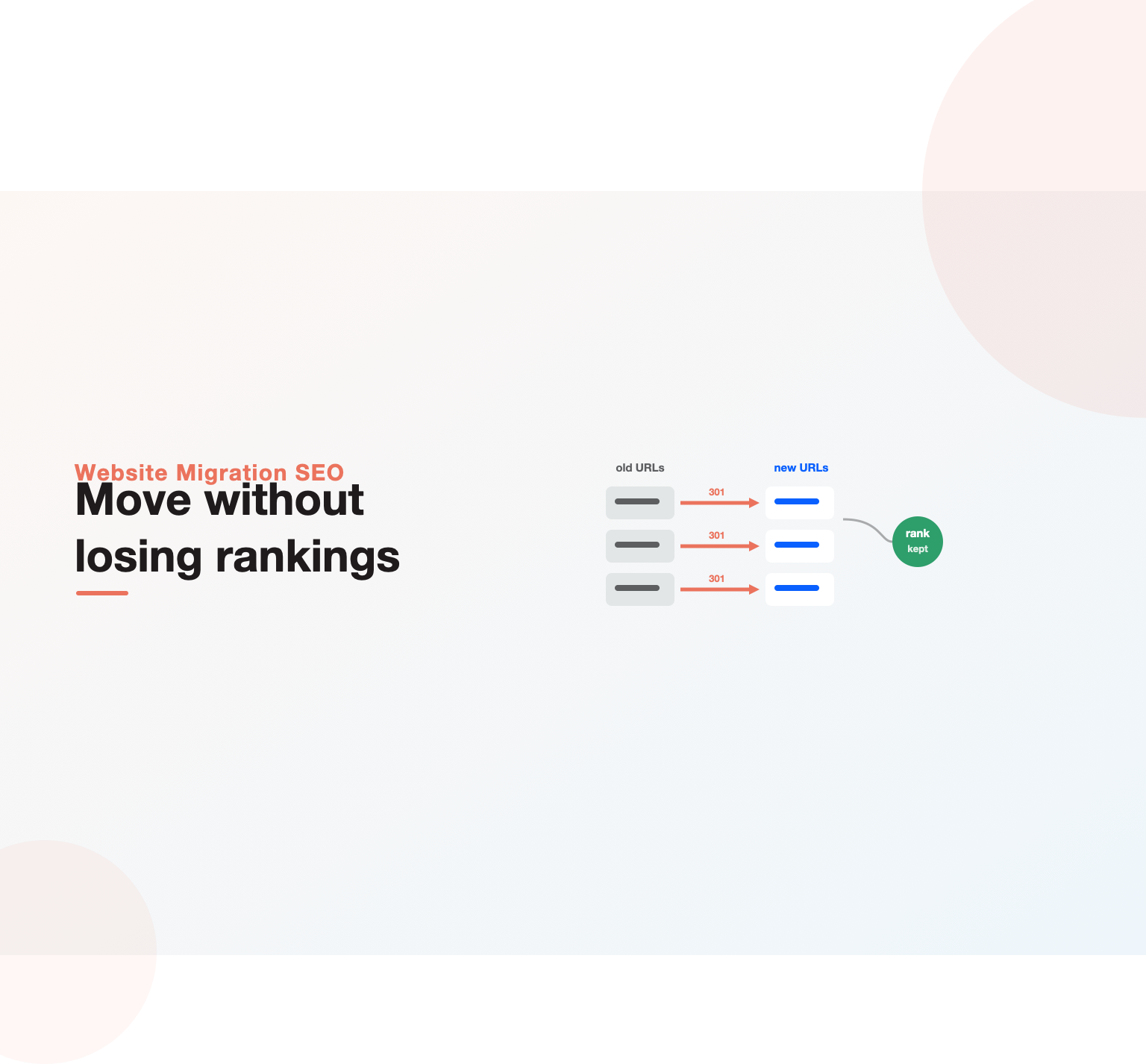
Website migration SEO is the practice of moving a site to a new domain, platform, design, or URL structure without losing the organic rankings and traffic it has earned. Migrations put search performance at risk because they change the URLs, content, and technical signals that search engines have already indexed, and the most common way sites lose traffic is broken or missing redirects that sever the link between old URLs and their replacements. Getting a migration right is mostly about preparation and mapping: benchmark what you have, map every old URL to its new destination with permanent redirects, preserve the content and technical signals that earn rankings, and monitor closely after launch so any drop is caught and fixed fast rather than discovered months later.
Key Highlights
- Migrations risk traffic because they change the URLs, content, and technical signals search engines already rank, so the goal is continuity, not just a successful launch.
- A complete old-to-new URL map with permanent 301 redirects is the single most important deliverable, because broken redirects are the top cause of lost rankings.
- Benchmarking performance before you migrate is essential, since you cannot detect or diagnose a drop without a clear record of what you had.
- Preserve on-page content, metadata, internal links, and structured data through the move, because rankings depend on those signals surviving intact.
- Close monitoring in the weeks after launch is what turns an inevitable dip into a quick recovery rather than a slow, unexplained decline.
What counts as a website migration
The term covers a wide range of changes, and knowing which type you face shapes the risk and the plan. A domain migration moves the site to a new web address, changing every URL and carrying significant risk because search engines have to transfer all the signals to the new domain. A platform or CMS migration moves the site to different underlying technology, which often changes URL structures and templates even when the domain stays the same. A design or redesign migration changes how the site looks and is built, and a URL-structure change reorganizes the address of pages, both of which can affect rankings if handled carelessly.
Other common cases include moving from HTTP to HTTPS, consolidating multiple sites into one, or splitting one site into several, each with its own considerations. Many real projects combine several of these at once, a replatform that also redesigns and restructures URLs, which multiplies the risk because more signals change simultaneously. The first step in any website migration SEO plan is therefore to define exactly what is changing, because a redesign that keeps every URL is a very different project from a domain move that changes them all, and the plan has to match the actual scope rather than a generic checklist.
Why migrations cause traffic loss
Migrations lose traffic because they disturb the signals search engines rely on to rank a site, and the disturbance is rarely a single cause. The most frequent culprit is redirects: when old URLs are not redirected to their new equivalents, or are redirected to the wrong pages, the ranking authority those old URLs held is lost, and users and crawlers hit dead ends. Because search engines indexed the old URLs, failing to route them cleanly to the new ones severs the connection that carried the rankings, which is why redirect errors dominate the list of website migration SEO disasters.
Beyond redirects, traffic falls when content changes or is dropped during the move, when on-page elements like titles and headings are altered or lost, when internal linking is not rebuilt, or when technical problems, slow pages, blocked resources, missing structured data, arrive with the new build. Even a flawless migration usually sees a temporary dip as search engines recrawl and reprocess the changed site, which is normal and recovers. The danger is the lasting loss that comes from broken continuity, and understanding these causes is what lets you plan a website migration SEO process that prevents them rather than reacting after the damage is done.
Before you migrate: benchmark and plan
Preparation is where a migration is won, and it starts with benchmarking the performance you are about to put at risk. Record your current rankings for important terms, your organic traffic by page, your top-performing and highest-authority pages, and your key conversion numbers, so you have a clear baseline to compare against and to diagnose any drop. Crawl the existing site with a tool like Screaming Frog to capture a complete inventory of URLs, because you cannot map what you have not catalogued, and this inventory becomes the backbone of the redirect plan.
With the baseline captured, plan the migration in detail before touching anything live. Define exactly what is changing, identify your most valuable pages so they get extra attention, and build the timeline and responsibilities so nothing is improvised on launch day. Migrating during a lower-traffic period gives you room to catch problems with less at stake, and having a rollback plan means a serious issue does not become a catastrophe. This planning stage is unglamorous, but skipping it is how teams end up discovering after launch that they never recorded what they had, which makes a drop impossible to even measure, let alone fix.
URL mapping and redirects: the core of migration SEO
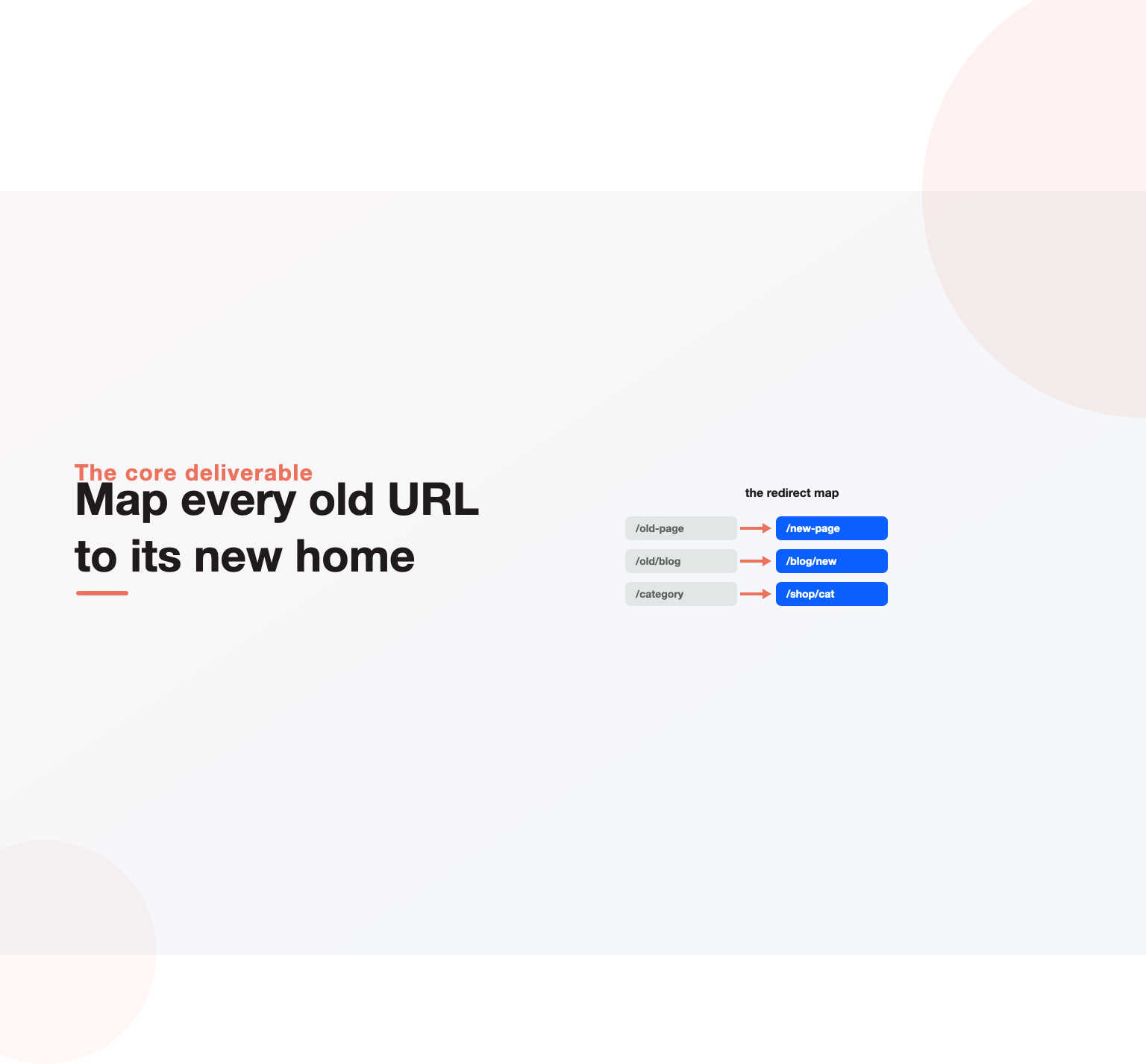
If a website migration has one make-or-break deliverable, it is the URL map: a complete, checked list pairing every old URL with the single best matching new URL. Every page that had value, and especially every page with rankings, traffic, or backlinks, must redirect to its closest equivalent, so the authority it earned transfers to the new location. Use permanent 301 redirects rather than temporary ones, because permanent redirects tell search engines the move is final and pass along the ranking signals, which temporary redirects do not do reliably.
The discipline is in the detail. Map each old URL to the most relevant new page rather than dumping everything to the homepage, which wastes the specific relevance and authority each page held and is treated by search engines as a soft error. Avoid redirect chains, where one redirect points to another that points to a third, because each hop loses a little value and slows crawling, so redirect old URLs straight to their final destination. Test every redirect before and after launch to confirm it resolves correctly with the right status code. This mapping work is tedious on a large site, but it is the single highest-leverage task in the entire website migration SEO process, and cutting corners here is the most common reason website migration SEO goes wrong and destroys rankings.
Not sure why your pages are not ranking or bringing enquiries?
Our team reviews your current setup and shows you where the opportunities are. See how our SEO services work.
Preserving content and on-page signals
Rankings rest on content and on-page elements, so a migration has to carry them across intact rather than quietly changing or dropping them. Preserve the content of valuable pages, since removing or thinning content that earned rankings will cost those rankings, and keep the title tags, meta descriptions, headings, and image alt text that search engines associate with each page. When a redesign changes templates, it is easy to lose these elements without noticing, so treat their preservation as an explicit requirement rather than an assumption.
Internal linking deserves particular attention, because a migration often rebuilds navigation and templates in ways that can strand pages or drop the contextual links that route authority. Rebuild the internal link structure so important pages stay well-linked and no page is orphaned, which is the same discipline covered in our internal linking guide applied to a site in transition. Structured data should be carried over and revalidated too, since markup lost in a template change removes rich-result eligibility. The principle throughout is continuity: the new site should retain every signal the old one used to rank, and any change should be deliberate rather than an accident of the rebuild.
Technical preparation and staging
Technical readiness protects a migration from the problems that arrive with a new build. Prepare the new site on a staging environment that is blocked from search engines, so you can build and test without the half-finished version being crawled and indexed. On staging, verify that the important content renders correctly, that redirects are configured, that titles and structured data are in place, and that the site is fast and crawlable, using a crawl of the staging build to catch issues before they go live. A run through a technical SEO checklist against the new build surfaces the problems that would otherwise only appear after launch.
Pay special attention to the technical traps that commonly break migrations. Make sure the new site is not accidentally blocking search engines in its robots file or with noindex tags left over from staging, which is a shockingly common and catastrophic error. Confirm that resources are not blocked, that the site works on mobile, and that any move to a JavaScript-heavy build still serves content search engines can read, which ties directly into JavaScript SEO when a replatform changes how pages render. Catching these on staging is the difference between a smooth launch and an emergency, because a noindex tag or a blocked robots file discovered a week after go-live has already done its damage.
Launch day and the go-live checklist
Launch is where preparation meets reality, and a disciplined checklist keeps it controlled. When the new site goes live, confirm immediately that it is accessible to search engines, that the staging blocks are removed, and that the robots file and meta robots tags allow crawling of the pages you want indexed. Verify that redirects are active and resolving correctly by testing a representative sample across page types, and check that the most important pages load properly with their content and on-page elements intact.
Then take the steps that help search engines process the change quickly. Submit updated sitemaps of the new URLs, and where the migration involves a domain change, use the change-of-address process in Google Search Console to signal the move explicitly. Keep the old sitemaps available temporarily so search engines rediscover the old URLs and follow their redirects to the new ones. Launch day is not the moment to relax but the moment to verify obsessively, because catching a broken redirect rule or a stray noindex in the first hours prevents the kind of damage that takes months to recover from once search engines have acted on it.
Post-launch monitoring and recovery
The work is not finished at launch; the weeks after are when you protect the rankings you carried over. Monitor closely: watch crawl errors and coverage in Search Console for spikes in 404s or redirect problems, track your rankings and organic traffic against the baseline you recorded, using the kind of SEO reporting that makes a drop obvious, and check that search engines are indexing the new URLs and dropping the old ones. A temporary dip as the site is recrawled and reprocessed is normal and expected, so the goal is to distinguish that ordinary settling from a real problem that needs fixing.
When monitoring surfaces an issue, act fast, because the sooner a broken redirect or a missing page is fixed, the less lasting damage it does. Look first at the usual suspects, redirect errors, pages returning the wrong status, missing content, or crawl blocks, and resolve them immediately. Because recovery timelines follow the same patient curve as the rest of the discipline, set expectations that a migration can take weeks to fully settle even when everything was done right, in line with how long SEO takes. Diligent monitoring is what turns the normal post-migration wobble into a controlled recovery rather than a slow slide nobody notices until a quarter later.
Platform and CMS migration specifics
Moving between platforms adds its own considerations on top of the universal rules. A CMS or platform migration often changes URL structures and templates by default, so the URL map and the preservation of on-page elements become even more important, since the new system may generate different addresses and strip elements the old templates included. Check how the new platform handles URLs, metadata, redirects, and structured data, and configure it to match or cleanly redirect from the old structure rather than accepting its defaults.
Ecommerce migrations are especially delicate because they combine large catalogs with the revenue stakes of a store, so every product and category URL needs mapping and every technical element needs preserving at scale, which connects directly to the concerns in ecommerce SEO, and the same stakes apply to large enterprise sites where a single template redirect touches thousands of pages. Platform moves also frequently introduce performance and rendering changes, so the new build has to be tested for speed and crawlability rather than assumed to be fine. The universal website migration SEO principles hold across every platform, but the specific traps, default URL formats, lost metadata, changed rendering, vary by system, so understanding your particular platform’s behavior is part of planning a safe move.
Common website migration mistakes
A handful of errors account for most migration disasters. Not redirecting old URLs, or redirecting them all to the homepage instead of their true equivalents, tops the list and is the fastest way to lose rankings. Leaving a staging noindex tag or a search-engine block in place after launch quietly deindexes the whole site. Failing to benchmark beforehand makes any drop impossible to measure or diagnose. Changing or dropping content and on-page elements during a redesign removes the signals that earned rankings. And skipping post-launch monitoring lets fixable problems fester into lasting damage.
The deeper mistake behind most of these is treating website migration SEO as a purely technical or design project and involving SEO too late, after decisions are locked and URLs are already changing. Migrations succeed when search implications are planned from the start, the redirect map is treated as essential, and testing and monitoring are built into the timeline. Avoiding these traps is less about expertise than about discipline and sequence, because a website migration rarely fails from a lack of knowledge and usually fails from a step that was rushed, skipped, or discovered too late to prevent.
Who should own website migration SEO
A website migration SEO effort fails most often not from a lack of technical skill but from being run as a design or engineering project with search bolted on at the end. The choices that determine risk, whether URLs change, how templates are rebuilt, what content moves, are made early and are expensive to reverse once the build is underway, so website migration SEO has to be planned from the first decision rather than reviewed at the end. Bringing search expertise into the room at the planning stage, alongside design, development, and the business, is what lets the redirect map, content preservation, and technical requirements shape the project instead of scrambling to catch up with it.
Ownership matters as much as timing. Someone needs to own the website migration SEO plan end to end, the benchmarking, the URL map, the staging tests, the launch checks, and the post-launch monitoring, so nothing falls between teams during a move that touches every one of them. On larger projects this is where external specialists earn their keep, because a botched move is so costly that experienced oversight pays for itself, which is why our SEO consulting is best engaged before the build starts rather than after a drop. Clear ownership turns the plan from a document nobody follows into a project that actually protects rankings.
Want a team to run this SEO work for you?
Book a free 30-minute strategy call and leave with a clear next step for your business.
A website migration SEO checklist
It helps to distill website migration SEO into a sequence you can hold people to. Before the move: benchmark rankings, traffic, top pages, and conversions; crawl and inventory every URL; define exactly what is changing; and build the complete old-to-new redirect map. During the build: prepare the new site on a blocked staging environment, preserve titles, content, headings, and structured data, rebuild internal links, and test redirects and crawlability on staging before anything goes live.
At launch: remove the staging blocks, confirm crawlability and that no stray noindex survived, verify redirects resolve correctly, submit new sitemaps, and use the change-of-address tool for a domain move. After launch: monitor crawl errors, rankings, and traffic against the baseline, confirm the new URLs index and the old ones drop, and fix any redirect or crawl issue fast. Run through this website migration SEO checklist in order and the move becomes a controlled process, because most disasters trace back to a skipped or rushed step rather than a genuinely hard problem, and pairing it with a technical SEO checklist covers the build-quality half of the work.
Migrations and AI search
The same continuity that protects traditional rankings through a migration also protects visibility in AI search, so the discipline serves both at once. AI answer engines rely on being able to crawl and understand your content, so preserving your URLs, content, and technical signals keeps you eligible for citation in AI answers just as it keeps you ranking in classic search. A migration that breaks crawlability or strips content can quietly remove you from AI answers as well as search results, and because that visibility is harder to monitor, the loss can go unnoticed longer.
The practical implication is to hold the same standard for a migration whether you are protecting rankings or AI visibility: clean redirects, preserved content and structure, and a crawlable, fast new build. When we manage migrations for clients through our SEO consulting services, the plan protects both traditional and AI-search visibility together, and it connects to the wider SEO services program so the move strengthens the site rather than setting it back. A well-run website migration SEO project is an opportunity to improve the foundations, and handled with continuity in mind it can leave a site better positioned across every kind of search. The teams that treat a migration as a chance to fix old redirect debt, prune dead pages, and tighten the internal structure often emerge with cleaner foundations than they started with, turning a risky move into a genuine upgrade. When budgeting a redesign, see our breakdown of website design pricing so migration work is included from the start.
Key Takeaways
- Treat a website migration as a continuity project: the goal is to carry every ranking signal, URLs, content, links, and technical elements, across to the new site intact.
- Build a complete old-to-new URL map with permanent 301 redirects to true equivalents, avoid chains and homepage dumping, and test every redirect before and after launch.
- Benchmark rankings, traffic, and top pages before migrating, because you cannot detect or diagnose a drop without a clear record of what you had.
- Prepare and test on a blocked staging environment, and on launch day verify crawlability, redirects, and that no staging noindex or robots block survived.
- Monitor closely for weeks after launch, distinguish the normal temporary dip from real problems, and fix redirect or crawl issues fast to protect both traditional and AI-search visibility.
Frequently asked questions
What is website migration SEO?
Website migration SEO is the practice of moving a site to a new domain, platform, design, or URL structure without losing its organic rankings and traffic. It centers on continuity: benchmarking current performance, mapping every old URL to its new equivalent with permanent redirects, preserving the content and technical signals that earn rankings, and monitoring closely after launch. The aim is to make the move invisible to search engines in its effect on rankings, even when everything about the site changes.
Why do websites lose traffic after migration?
The most common cause is redirect problems: old URLs that are not redirected, or are redirected to the wrong pages or all to the homepage, which severs the ranking authority those URLs held. Traffic also drops when content or on-page elements are changed or lost, when internal linking is not rebuilt, or when technical issues like a leftover noindex tag or blocked resources arrive with the new build. A temporary dip during recrawling is normal; lasting loss comes from broken continuity.
What redirects should I use for a migration?
Use permanent 301 redirects, which tell search engines the move is final and pass ranking signals to the new URLs, rather than temporary redirects that do not transfer authority reliably. Map each old URL to its closest matching new page instead of redirecting everything to the homepage, and avoid redirect chains by pointing old URLs straight to their final destination. Test every redirect before and after launch to confirm it resolves with the correct status code.
How do I prepare for a website migration?
Benchmark your current rankings, organic traffic by page, top pages, and conversions so you have a baseline, then crawl the existing site to inventory every URL. Define exactly what is changing, identify your most valuable pages, build the URL redirect map, and prepare the new site on a blocked staging environment where you can test content, redirects, and technical health before launch. Plan the timeline, assign responsibilities, and have a rollback plan.
How long does it take to recover from a migration?
Even a well-executed migration usually causes a temporary dip as search engines recrawl and reprocess the changed site, and full settling can take anywhere from a few weeks to a couple of months depending on the size of the site and the scale of the change. A clean migration recovers to its prior performance or better; a lasting decline usually signals a real problem, like broken redirects, that should be found and fixed rather than waited out.
Do I need to redirect old URLs after changing my site?
Yes, redirecting old URLs is the single most important part of protecting rankings through a migration. Search engines indexed those old URLs and hold ranking authority against them, so without permanent redirects to the new equivalents, that authority is lost and users and crawlers hit dead ends. Every old URL that had value, traffic, rankings, or backlinks, should redirect to its closest new match, which is what carries the earned authority to the new site.
Should I migrate my whole site at once or in stages?
It depends on the size and complexity of the site and your risk tolerance. Large or complex migrations can benefit from a phased approach that limits how much changes at once and makes problems easier to isolate, while smaller sites are often migrated in a single move. Whichever you choose, benchmark first, prepare complete redirects, test on staging, and migrate during a lower-traffic period so any issues surface with less at stake.
Does a migration affect AI search visibility?
Yes, because AI answer engines rely on crawling and understanding your content just as traditional search does, so a migration that breaks redirects, strips content, or harms crawlability can remove you from AI answers as well as search results. The same continuity practices that protect rankings, clean redirects, preserved content and structure, and a crawlable new build, protect AI-search visibility too, which is why a careful migration guards both at once.
Ready to put this into practice?
Talk to the team that runs SEO, AI search and paid growth programs every day.
Book a Strategy Call →