 Skip to content

JavaScript SEO: How to Make JS Sites Rank
JavaScript SEO makes content rendered by React, Vue, or Angular fully crawlable and indexable. Rendering strategies, framework fixes, an audit workflow, and why AI crawlers change the stakes.
Quick Answer
In plain terms, JavaScript SEO is the practice of making sure content rendered by JavaScript is discoverable, crawlable, and indexable by search engines, so a site built with frameworks like React, Vue, or Angular ranks as well as a traditional HTML site. The problem it solves is simple to state and easy to get wrong: search engines must download, render, and then index your pages, and when critical content or links only appear after JavaScript runs, they can be delayed, degraded, or missed entirely. Fundamentally it is about rendering strategy, making the important content and links present in the HTML the crawler receives, or reliably rendered soon after, rather than trapped behind client-side code that bots may never execute.
Key Highlights
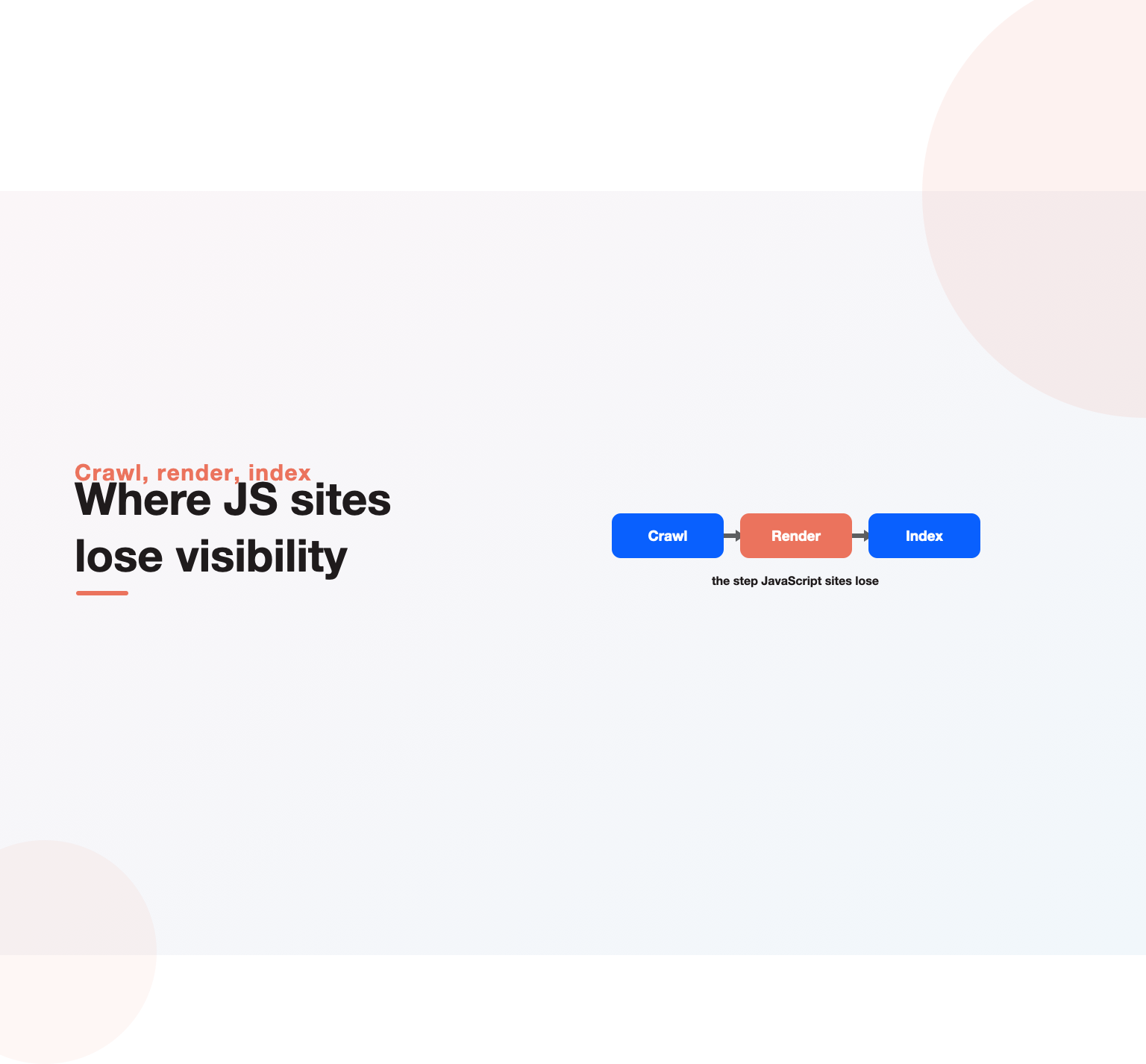
- Search engines crawl, then render, then index, and that render step is where JavaScript sites lose visibility when content depends on code the crawler delays or never runs.
- The fix is almost always a rendering decision: server-side rendering, static generation, or pre-rendering put content in the initial HTML, while pure client-side rendering puts it at risk.
- Links, not just text, must exist in the rendered HTML as real anchor tags, because buttons and script-driven navigation are often not followed as links.
- Testing matters more than assuming: the rendered DOM, not the raw source, is what you must inspect, using tools like Google’s URL Inspection and a JavaScript-rendering crawl.
- AI crawlers mostly do not execute JavaScript at all, so client-rendered content that Google eventually sees can be completely invisible to AI answer engines.
What JavaScript SEO is, and why JavaScript breaks SEO
At its core, JavaScript SEO is the set of techniques that keep a JavaScript-heavy site fully accessible to search engines. On a classic server-rendered site, the HTML the server sends already contains the content and links, so a crawler reads everything immediately. On a JavaScript site, the server often sends a near-empty page plus a bundle of code, and the content only appears after that code runs in a browser. Search engines can run that code, but doing so is expensive and deferred, which introduces the gap where visibility is lost.
The reason JavaScript breaks SEO is that crawling and rendering are two separate, unequal steps. A crawler can fetch a billion URLs cheaply, but rendering each one, actually executing the scripts in a headless browser, costs far more compute, so it happens later and imperfectly. If your content, internal links, canonical tags, or metadata depend on JavaScript that has not executed yet, the search engine may index a blank or partial version of the page. This is why two sites with identical visible content can perform completely differently: one puts everything in the initial HTML, the other hides it behind rendering. The discipline exists to close that gap so the version a search engine indexes matches the version users see.
How Google renders JavaScript: crawl, render, index
Google processes a JavaScript page in three phases, and understanding them is the foundation of JavaScript SEO. First it crawls, fetching the raw HTML and queuing the page. Then it renders, using a headless Chromium to execute the JavaScript and build the final DOM, which can happen seconds or, historically, much longer after the initial crawl. Only after rendering does it index what the rendered page actually contains. The Google Search documentation on JavaScript describes this render queue explicitly, and it is the single most important concept to internalize.
The practical consequences are large. Because rendering is deferred, JavaScript content is indexed more slowly than server-rendered content, which hurts sites that depend on freshness. Because the render is not guaranteed to be complete or identical to a real browser, anything fragile, content that needs a user action, data that loads slowly, or scripts that error, may simply not make it into the index. And other search engines and crawlers render JavaScript far less reliably than Google, if at all. Sound JavaScript SEO therefore does not rely on the render step going perfectly; it minimizes what has to be rendered by putting critical content and links in the HTML from the start.
Rendering strategies: the core decision in JavaScript SEO
Almost every JavaScript SEO outcome traces back to how a site renders, so this is the decision that matters most. Client-side rendering, where the browser does all the work from a near-empty HTML shell, is the riskiest for search because it puts the entire burden on the crawler’s render step. Server-side rendering, where the server executes the JavaScript and sends fully-formed HTML, is the safest because the crawler receives complete content immediately, exactly like a traditional site. Static site generation pre-builds pages at deploy time and serves plain HTML, which is ideal for content that does not change per request.
Between these sit hybrid approaches that dominate modern JavaScript SEO. Hydration lets a server-rendered or statically-generated page arrive as real HTML and then become interactive once the JavaScript loads, giving both crawlability and app-like behavior. Dynamic rendering, serving pre-rendered HTML to bots while users get the client-side app, was long recommended as a workaround but is now treated as a stopgap rather than a first choice, because maintaining two paths is fragile. The rule of thumb is straightforward: get your important content and links into the initial HTML through server rendering, static generation, or hydration, and reserve pure client-side rendering for parts of a page that do not need to rank, like an interactive dashboard behind a login.
Common JavaScript SEO problems
Most JavaScript SEO failures fall into a handful of recurring patterns. The most common is content that is not in the rendered HTML at all, because it loads only after a user interaction, a click, a scroll, a tab switch, which a crawler never performs. Lazy-loaded content that never triggers for a bot is invisible, so anything important must load without requiring interaction. Another frequent trap is internal links implemented as buttons or script-driven navigation instead of real anchor tags with href attributes; crawlers follow href links, not click handlers, so a beautiful JavaScript menu can leave whole sections undiscovered.
The list continues with issues that quietly erode rankings. Routing that relies on fragment identifiers or non-standard URLs can prevent pages from being indexed as distinct URLs. Metadata, titles, canonicals, and robots directives injected by JavaScript may be missed if the render is incomplete, so they belong in the server response wherever possible. Blocked JavaScript resources in the robots file stop Google from rendering the page correctly, since it cannot run code it is not allowed to fetch. Slow or error-prone scripts can cause the render to time out with content missing. Each of these is fixable, and catching them is exactly what a disciplined JavaScript SEO process and a solid technical SEO checklist are for.
Not sure why your pages are not ranking or bringing enquiries?
Our team reviews your current setup and shows you where the opportunities are. See how our SEO services work.
Frameworks and JavaScript SEO: React, Next.js, Vue, Angular
Frameworks shape how you approach JavaScript SEO, though the underlying rules never change. A plain React app created with a client-only toolchain renders entirely in the browser, which is the classic high-risk setup and usually needs a rendering framework layered on top. Next.js has become the default answer for React SEO precisely because it makes server-side rendering and static generation straightforward, so content arrives as real HTML by default. The same pattern holds in the Vue ecosystem, where Nuxt provides server rendering and static generation, and in Angular, which offers Angular Universal for server-side rendering.
The lesson across frameworks is consistent: the framework itself is rarely the problem, the rendering mode you choose within it is. A React or Vue site can rank perfectly when it renders on the server or ships static HTML, and can fail badly when it renders only on the client. So the first JavaScript SEO question for any stack is not which framework you use but whether your important pages send complete HTML to the crawler. If you are choosing or refactoring a stack, pick the rendering approach that puts content in the initial response, and treat client-only rendering as the exception reserved for genuinely interactive, non-indexable surfaces.
How to test and debug JavaScript SEO
You cannot do JavaScript SEO by assumption, because the raw source and the rendered page are different documents, and only the rendered one gets indexed. The foundational habit is to compare them: view the page source to see what the server sent, then inspect the rendered DOM in your browser’s developer tools to see what JavaScript produced. If your content and links exist in the rendered DOM but not the source, they depend on rendering, which is the signal to check how reliably search engines see them.
From there, use the tools built for the job. Google’s URL Inspection tool in Search Console shows the rendered HTML and screenshot Google actually captured, which is the ground truth for whether your content made it in. A JavaScript-rendering crawl in a tool like Screaming Frog or a cloud crawler reveals at scale which pages render correctly and which lose content or links. Chrome’s developer tools and the Rich Results and Mobile-Friendly checks help confirm rendering, structured data, and usability. The workflow for solid JavaScript SEO is to render, compare, and verify on real pages rather than trusting that the framework did the right thing, because the failure modes are invisible until you look at what the crawler receives.
Best practices for JavaScript SEO
Good JavaScript SEO comes down to a set of durable practices. Put critical content and internal links in the server-rendered or statically-generated HTML so crawlers get them without rendering. Use real anchor tags with href attributes for every link that should be followed. Keep metadata, canonical tags, and robots directives in the server response, not injected client-side. Never block JavaScript or CSS resources that search engines need to render the page. Ensure content loads without requiring user interaction, and avoid gating important text behind clicks or infinite scroll that a bot will not trigger.
Beyond the mechanics, treat rendering as an architectural decision made once and enforced, not a per-page afterthought. Standardize on a rendering approach that ships HTML, monitor rendered output as part of your release process so a front-end change never silently breaks indexing, and fold JavaScript SEO checks into the same cadence as the rest of your technical work rather than reacting after traffic drops. This is where a modern understanding of how SEO works pays off: JavaScript SEO is not a separate discipline so much as technical SEO applied to a rendering pipeline, and the sites that get it right build the checks into how they ship code.
Core Web Vitals and JavaScript performance
Heavy JavaScript is one of the biggest drags on page performance, and performance is both a ranking factor and a conversion factor, so JavaScript SEO and speed are tightly linked. Large bundles delay interactivity, cause layout shifts, and slow the largest contentful paint, all of which hurt the Core Web Vitals that feed into rankings and, more importantly, frustrate users. A page that renders slowly because it is shipping megabytes of script is failing both search engines and the people you want to convert.
The performance side of JavaScript search optimization is about shipping less and shipping smarter: code-splitting so each page loads only what it needs, deferring non-critical scripts, minimizing third-party tags, and using server rendering or static generation so meaningful content paints before the full bundle arrives, and a Lighthouse audit will surface the heaviest offenders. Done well, the same rendering choices that make a site crawlable also make it fast, which is why performance and This work tend to improve together. The reverse is also true, a bloated client-side app is usually both slow and hard to index, so fixing one problem often fixes the other.
How JavaScript SEO connects to AI search
Here is the twist that raises the stakes on Rendering-aware SEO in 2026: most AI crawlers do not execute JavaScript at all. Google invested years in building a render pipeline, but the crawlers behind many AI answer engines and assistants simply fetch the raw HTML and move on. That means content which is client-rendered, and which Google eventually sees after its render step, can be entirely invisible to the AI systems that increasingly mediate discovery. A site can rank in traditional search and still be absent from AI-generated answers purely because its content never existed in the HTML those crawlers read.
This makes server-side rendering and static HTML more important than ever, not less. If you want to be cited in AI answers as well as ranked in search, your content has to be in the HTML that any crawler receives without running code. In that sense, The practice has become foundational to AI visibility, and the same rendering discipline that fixes classic indexing also unlocks AI discoverability. When we build and maintain this for clients through our SEO services, rendering strategy is one of the first things audited, and for stacks that need deeper engineering work our SEO consulting services handle the architecture so a modern front end is fully visible to both search engines and AI answer engines. The payoff is compounding: a site that renders its content on the server earns faster indexing, more reliable rankings, and eligibility for AI citations from the same single investment, while a client-only build quietly pays a tax on all three at once.
Single-page applications and JavaScript SEO
Single-page applications, where the whole site runs inside one HTML document and swaps content with JavaScript as users navigate, concentrate every hard problem in this field into one architecture. Because navigation happens in the browser rather than through full page loads, an SPA must use the History API to give each view a real, unique, crawlable URL, not a fragment after a hash, or search engines will treat the entire app as a single page. Each of those URLs then has to return proper content and status codes when requested directly, so that a crawler landing on a deep link sees a real page rather than the app shell.
The subtle killers in SPAs are soft 404s and shared metadata. When a missing route returns the app shell with a 200 status instead of a genuine 404, search engines index empty pages and lose trust in the site. When every view inherits the same title and description because metadata is only updated client-side, pages become indistinguishable to search. Getting single-page applications right is the sharp end of this discipline: give every view a unique URL, correct status codes, and per-view metadata rendered into the HTML, and an SPA can rank; skip those and it stays a black box to crawlers. The same care that our on-page SEO fundamentals describe for titles and headings applies here, only it has to survive a client-side router.
Structured data, pagination, and lazy loading
Three feature areas cause outsized trouble on script-driven sites. Structured data injected purely by JavaScript can be missed when the render is incomplete, so product, article, and organization markup is safest emitted in the server response where every crawler and validator reads it immediately. Pagination in client-rendered listings often breaks because the paginated URLs are not real, crawlable links, which strands most of a large catalog or archive beyond page one. And lazy loading, while excellent for performance, hides content from bots when it only triggers on scroll or interaction that a crawler never performs.
The fixes are practical and worth building into any front end. Emit critical structured data server-side and validate it with Google’s Rich Results test rather than trusting a client-side injection. Implement pagination as genuine anchor links to distinct URLs so every page of a listing is discoverable. Use native lazy loading for images and make sure any lazy-loaded text or products are present in the rendered HTML without requiring a scroll, or load them server-side. When markup is emitted correctly, confirm it with the Rich Results test, which renders the page the way Google does and reports which structured-data types are actually eligible. A recurring pattern on script-driven sites is markup that validates in isolation but never appears in the rendered page, so testing the live URL rather than a snippet is what catches the real failures before they cost you eligibility. These are unglamorous details, but on a large site they decide whether the bulk of your content is ever seen, which is precisely why they belong in a repeatable audit rather than left to chance.
Want a team to run this SEO work for you?
Book a free 30-minute strategy call and leave with a clear next step for your business.
A practical JavaScript SEO audit workflow
A dependable audit turns this from guesswork into a routine. Start by fetching a sample page as raw HTML, then rendering the same URL, and diffing the two: whatever appears only after rendering is your risk surface. Next, run Google’s URL Inspection on key templates to confirm the rendered HTML and screenshot match what users see, and check that titles, canonicals, and structured data survived the render. Then run a JavaScript-rendering crawl across the site to find pages that lose content, links, or status codes at scale, and flag any soft 404s, missing metadata, or uncrawlable navigation.
Round it out with performance and coverage checks. Use a Lighthouse run to catch heavy bundles and layout shifts that both hurt users and slow indexing, and watch Search Console’s coverage and crawl-stats reports for pages stuck in a rendered-but-not-indexed state. Because a single front-end deploy can silently break any of these, the strongest teams run this audit as part of their release process rather than after a traffic drop, and pair it with the broader technical sweep so nothing regresses unnoticed. Treating the work this way is how a modern site stays fast to index instead of waiting weeks, which connects directly to the reality of how long SEO takes to show results when indexing itself is the bottleneck.
Replatforming to a JavaScript framework without losing rankings
Migrations are where Search optimization for JavaScript sites risk peaks, because a team rebuilds a working, server-rendered site on a modern framework and quietly ships a client-only version that search engines can no longer read. Traffic then falls weeks later, once the render backlog and dropped content show up in the index, long after the launch everyone celebrated. The defense is to treat rendering as a launch requirement, not a later optimization: decide before the build that important pages will ship server-rendered or statically generated HTML, and verify it on a staging environment with a rendering crawl before go-live.
Keep the fundamentals stable across the move. Preserve URLs or map them with clean redirects, carry over titles, canonicals, and structured data into the server response, and confirm that the rendered output on the new stack matches the old site’s crawlable content before you cut over. Where a legacy client-only app cannot be re-architected quickly, a prerendering service such as Prerender or a self-hosted renderer built on Puppeteer can serve static HTML to crawlers as a bridge while the proper rendering fix is built. Cross-check the result in Bing Webmaster Tools as well, since Bing renders less aggressively than Google and often exposes gaps early. This is exactly the kind of high-stakes engineering our SEO consulting team de-risks, because a botched framework migration can erase years of organic growth in a single release.
Key Takeaways
- Search engines crawl, then render, then index, so JavaScript content is indexed later and less reliably than server-rendered HTML, which is where visibility leaks.
- The core fix is a rendering decision: use server-side rendering, static generation, or hydration to put critical content and links in the initial HTML, and reserve client-side rendering for non-indexable surfaces.
- Use real anchor tags for links, keep metadata server-side, never block script resources, and make sure content loads without user interaction.
- Test by comparing raw source to the rendered DOM and using URL Inspection plus a JavaScript-rendering crawl, because failures are invisible until you look at what the crawler receives.
- Most AI crawlers do not run JavaScript, so rendering content on the server is now essential for AI-search visibility, not just traditional rankings.
Frequently asked questions
What is JavaScript SEO?
JS SEO is the practice of ensuring that content and links rendered by JavaScript are fully crawlable and indexable by search engines, so a site built with frameworks like React, Vue, or Angular can rank as well as a traditional HTML site. It centers on rendering strategy: making sure the important content exists in the HTML a crawler receives, rather than only appearing after client-side code runs.
Can Google index JavaScript content?
Yes, Google can render and index JavaScript, but it does so in a separate, deferred render step that is slower and less reliable than reading server-sent HTML. Content that depends on JavaScript is indexed later, and anything fragile, requiring user interaction, loading slowly, or erroring, may be missed. Other search engines and most AI crawlers render JavaScript far less reliably, if at all.
Is server-side rendering necessary for SEO?
It is not strictly required for Google, but it is the safest and most reliable choice, and it is effectively necessary if you want consistent indexing plus visibility in AI answers. Server-side rendering or static generation sends complete HTML to every crawler immediately, removing the risk that a deferred or incomplete render leaves your content out of the index.
Why is my JavaScript site not ranking?
The usual causes are content or links that only appear after JavaScript runs, links built as buttons instead of real anchor tags, metadata injected client-side, blocked script resources, or slow scripts that cause the render to time out. The way to diagnose it is to compare your raw page source with the rendered DOM and use Google’s URL Inspection tool to see what the crawler actually captured.
Does client-side rendering hurt SEO?
Pure client-side rendering carries the most risk because it puts the entire content burden on the crawler’s expensive, deferred render step, which slows indexing and can drop content entirely for engines that render poorly. It is fine for interactive, non-indexable surfaces like a logged-in dashboard, but content you want to rank should be server-rendered, statically generated, or hydrated from real HTML.
How do I test JavaScript SEO?
Compare the page source with the rendered DOM in your browser’s developer tools to see what depends on rendering, then use Google’s URL Inspection tool to view the rendered HTML and screenshot Google captured. Run a JavaScript-rendering crawl in a tool like Screaming Frog to check at scale which pages lose content or links, and verify structured data and mobile usability with Google’s testing tools.
Which framework is best for JavaScript SEO?
No framework is inherently best; the rendering mode you choose within it decides the outcome. Next.js for React and Nuxt for Vue are popular because they make server-side rendering and static generation easy, and Angular offers Angular Universal for the same purpose. Any of these ranks well when it ships HTML and struggles when it renders only on the client.
Do AI search engines read JavaScript?
Mostly no. Many AI crawlers fetch raw HTML without executing JavaScript, so client-rendered content that Google eventually indexes can be invisible to AI answer engines. This is why server-side rendering and static HTML are increasingly essential: to be both ranked in search and cited in AI answers, your content must exist in the HTML every crawler receives without running code.
Ready to put this into practice?
Talk to the team that runs SEO, AI search and paid growth programs every day.
Book a Strategy Call →