 Skip to content

AI Video Ads: Tools, Prices Compared and How to Make Ads That Convert (2026)
AI video ads explained: how to create them, script templates, avatar ad rules, and a price comparison of 12 AI video ad tools ($9 to $36 a month) versus human UGC.
Quick Answer
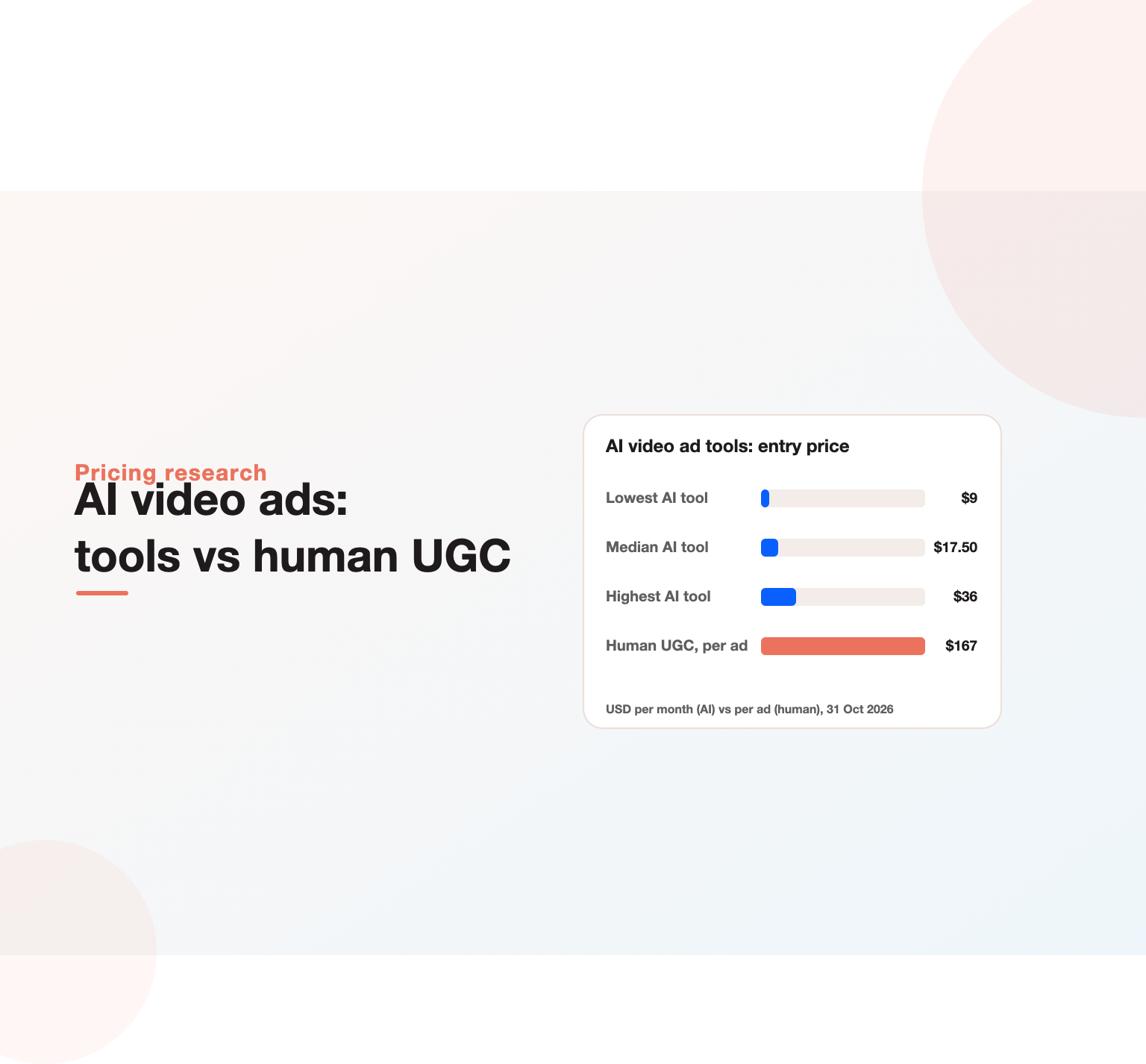
AI video ads are video advertisements created partly or fully with generative AI: scripts written by language models, footage generated from text or images, AI avatars or “AI actors” presenting the product, synthetic voiceovers, and automatic resizing and captioning for each platform. They let small teams produce many ad concepts quickly for Meta, TikTok, YouTube and connected TV. We compared the published pricing of AI video ad tools on 31 October 2026: 12 tools list a paid entry plan between 9 and 36 US dollars a month, with a median of 17.50 dollars, and five offer a free plan. By contrast, one human UGC service we reviewed charges 1,000 dollars a month for six creator-filmed ads, about 167 dollars per ad.
Key Highlights
- We reviewed the pricing pages of AI video ad generators, avatar tools and AI video editors on 31 October 2026.
- 12 tools publish an entry price from 9 to 36 dollars a month; the median is 17.50 dollars.
- Five tools offer a free plan, and two offer a one-dollar trial.
- Most tools now price in credits: Runway’s 15-dollar plan buys about 52 seconds of generated video a month.
- Human creator ads still cost far more: about 167 dollars per ad in the human UGC service we reviewed.
- The winning approach combines AI for volume and variation with human insight for concepts, proof and brand safety.
What are AI video ads?
A few years ago, a video ad needed a script, a shoot, actors, editing and several rounds of revisions. Today, much of that chain can be generated. AI video ads use one or more of these techniques:
- Script generation: a language model writes hooks, scripts and variations from a product description or URL.
- AI avatars and actors: a synthetic presenter, sometimes modelled on a real person with consent, delivers the script on camera.
- Text-to-video and image-to-video: models generate product shots, scenes or b-roll from a prompt or a still image.
- Synthetic voice: natural voiceovers in many languages and accents.
- Automated editing: captions, cuts, music, resizing for 9:16, 1:1 and 16:9, and brand overlays.
- URL-to-ad: paste a product page and get several finished ad drafts.
Interest is growing fast. “ai video ads” draws around 900 searches a month in the US, and related searches such as “ai video ads generator”, “ai avatar video ads” and “how to create video ads with ai” add hundreds more, alongside large branded searches for individual tools.
It helps to separate two very different goals. Some teams use these tools to replace production they could not afford, such as their first video ads at all. Others use them to multiply production they already have, turning one shoot into fifty variations for testing and localisation. The tools, budgets and quality bars differ for each, so decide which goal you are pursuing before choosing software. Throughout this guide we point out where advice differs between the two.
Why AI video ads matter now
Two forces push advertisers toward AI video. First, short vertical video dominates feeds on TikTok, Instagram Reels, Facebook and YouTube Shorts, and each platform wants native-looking creative. Second, ad delivery systems reward creative variety. Meta’s guidance on creative diversification with Meta Andromeda encourages advertisers to supply a range of distinct creative so the system can match different ads to different people. Our analysis of Meta Andromeda found that even large advertisers ran only three to six concepts across dozens of ads.
AI video tools make it affordable to produce more concepts, test them faster and localise them for different markets. The risk is the opposite of the opportunity: if every advertiser generates the same avatar-led, template-driven ads, they blur together. Quality of ideas still decides results.
Our research: what AI video ad tools cost
We read the pricing pages of AI video ad generators, avatar tools and AI video editors and recorded the cheapest paid plan, how it is billed, any free option and what the plan includes.
| Tool | Type | Entry price (USD/month) | Free option | What the entry plan includes |
|---|---|---|---|---|
| InVideo | AI video generator | 9 per seat | No | 190 credits, about seven short AI clips |
| Pika | AI video generator | 10 | Free plan | 900 credits |
| Pencil | AI ad generator | 14 | Trial | 50 generations |
| Creatify | AI video ad generator | 15 | Free option | 55 credits, about seven short clips |
| Runway | AI video generator | 15 | Free plan | 625 credits, about 52 seconds of video |
| Kapwing | AI video editor | 16 | Free plan | 1,000 credits |
| Synthesia | AI avatar video | 19 | Free plan | 1,250 credits |
| Captions | AI editor and AI actors | 24.99 | Trial | Generative footage and AI actors |
| HeyGen | AI avatar video | 29 | Free plan | Avatar videos up to 30 minutes |
| MakeUGC | AI UGC video ads | 29 (billed yearly) | 1-dollar trial | AI actors and ad templates |
| Zeely | AI ad generator | 29.95 | No | 2,500 credits |
| Topview | AI video ad generator | 36 (billed yearly) | No | Credit plan |
| Icon (human UGC) | Creator-filmed ads | 1,000 | Refund guarantee | Six human UGC ads |
Prices are the lowest paid monthly list price shown, except where the vendor shows only an annual price. Several tools offer 20 to 50 percent off for annual billing. Two well-known tools, Arcads and AdCreative.ai, did not display readable pricing when we checked, and Quickads offers a one-dollar trial with plans available through a form.
What the numbers show
- Entry is cheap. Every published entry plan sits between 9 and 36 dollars a month, and the median is 17.50 dollars. Five tools have free plans.
- Credits hide the real cost. Entry plans buy limited generation. Runway’s 15-dollar plan covers about 52 seconds of generated video a month; Creatify’s 15-dollar plan covers about seven short clips. Serious testing needs higher tiers.
- AI is roughly two orders of magnitude cheaper per ad than human UGC. At about 167 dollars per creator-filmed ad versus a few dollars of credits per AI clip, AI wins on cost. Human ads still often win on authenticity and trust.
- Categories are blurring. Ad generators add avatars, avatar tools add ad templates, and editors add generative footage.
Vendor pages for Creatify, HeyGen and Runway show how quickly credit allowances change between tiers.
Types of AI video ad tools
| Type | Best for | Examples |
|---|---|---|
| AI video ad generators | Turning a product URL or brief into finished ad drafts | Creatify, Topview, Zeely, Pencil, Quickads |
| AI avatar and actor tools | Presenter-style and UGC-style ads with synthetic people | HeyGen, Synthesia, Captions, MakeUGC, Arcads |
| Generative video models | Product shots, scenes and b-roll from prompts or images | Runway, Pika, InVideo’s generation features |
| AI video editors | Editing real footage faster: captions, cuts, resizing | Kapwing, Captions, VEED |
| Ad platform tools | Variations and enhancements inside the ad manager | Meta Advantage+ creative, TikTok Symphony, Google and Amazon generators |
Most teams use two: one tool to generate concepts and one to edit and adapt. Platform-native features are worth testing too, because they work inside the account where results are measured.
Not sure which marketing channels are worth your budget?
Our team reviews your current setup and shows you where the opportunities are. See how our digital marketing consulting work.
How to create video ads with AI: a step-by-step workflow
- Start with research, not the tool. Collect customer reviews, sales objections and the words buyers use. These become hooks and scripts.
- Define three to five concepts. Each concept targets a persona and a problem: for example, “busy parent who wants healthy dinners in 15 minutes” versus “fitness fan tracking protein”.
- Write scripts with a hook in the first two seconds. A language model can draft ten hooks per concept, then pick the strongest. Our guide to ChatGPT for marketing includes ad-writing prompts.
- Choose the format per concept. Avatar testimonial, product demo with generated b-roll, text-led motion graphic, or real footage edited with AI.
- Generate, then edit. Produce drafts in your AI video ads generator, then tighten pacing, add captions, brand colours and a clear call to action.
- Adapt for placements. Create 9:16 for Reels, Stories and TikTok, 1:1 or 4:5 for feeds, and 16:9 for YouTube and connected TV.
- Review for accuracy and compliance. Check every claim, disclosure and use of likeness before launch.
- Launch concepts side by side in a broad campaign and let the platform allocate budget, then iterate on winners.
Script templates for AI video ads
Strong scripts matter more than the tool. These five structures cover most direct-response needs. Fill the brackets with insights from customer research.
1. Problem, agitation, solution (15 to 20 seconds)
Hook: “Still [painful situation]?” Show the frustration in one shot. Agitate: “Every [time period] you lose [specific cost].” Solution: “[Product] fixes it by [mechanism].” Proof: one review line or number. CTA: “Try it [offer].”
2. Before and after (10 to 15 seconds)
Split screen or sequence: the messy before, the clean after, with one caption naming the change and the time it took. Works well with generated b-roll and real product shots.
3. Three reasons (20 to 30 seconds)
Hook: “Three reasons [audience] switch to [product].” One reason per beat, each with a visual. Close with the strongest proof point.
4. Objection buster (15 seconds)
Hook with the objection buyers actually raise: “Isn’t [product] expensive?” Answer with a specific comparison or guarantee. Avatar presenters suit this format because the message is informational.
5. Demo in one take (10 to 20 seconds)
Show the product doing its main job, start to finish, with captions explaining each step. Generated footage rarely beats a real demo here, so use AI for editing and captions.
Ask a language model for ten hooks per template, then choose the three that sound most like your customers. Our guide to Facebook ad copy covers the principles behind strong hooks.
A creative testing framework for AI video
Cheap production tempts teams to launch dozens of ads at once. A structured approach learns faster.
- Test concepts first. Launch four to six genuinely different concepts, each with two or three variations, in one broad campaign.
- Give each round enough budget to reach a meaningful number of conversions over one to two weeks.
- Read spend distribution and cost per result. Platforms move budget toward concepts they can match to audiences.
- Iterate on winners with new hooks, presenters, formats and lengths.
- Replace losers with new ideas, not small edits of the same idea.
- Graduate proven concepts to human-filmed versions where authenticity could lift results further.
On Meta, broad and Advantage+ setups give the system room to find audiences for each concept; see our guide to Meta Advantage+.
Budget example: a month of AI video ads
Here is an illustrative production budget for a small ecommerce brand, using the price ranges in our research. Treat it as a method.
- Generation tool on a mid tier: roughly 40 to 100 dollars a month for enough credits to produce 20 to 40 short clips, including retries.
- Avatar or presenter tool: roughly 29 to 50 dollars a month for presenter-led explainers.
- Editing tool: roughly 16 to 25 dollars a month for captions, resizing and brand overlays.
- Human time: about two days for research, scripting, review and editing.
That is often under 200 dollars in tools for a month of concepts, compared with around 1,000 dollars for six human UGC ads in the service we reviewed. The media budget still has to be large enough to test them properly; our guide to Facebook ads budgets covers how to split testing and scaling spend.
Building an AI video production pipeline
Teams that produce AI video ads every week usually settle on a simple pipeline with clear owners:
- Insight owner maintains a living document of customer pains, objections, phrases and proof points.
- Creative strategist turns insights into monthly concept briefs and hooks.
- Producer generates drafts in the AI tools, manages credits and keeps an asset library.
- Editor finishes ads, checks pacing, captions and brand standards.
- Reviewer signs off claims, disclosures and likeness rights.
- Media buyer launches tests and reports results by concept back to the strategist.
In a small business one or two people cover all six roles. Writing them down still helps, because each step has a different quality bar. For ecommerce brands, connecting this pipeline to catalogue ads multiplies its value; see our guide to Facebook ads for ecommerce.
AI avatar video ads: when they work and when they do not
AI avatar video ads are the most visible part of this trend, and the most divisive. They work well for explainer-style ads, multilingual versions of a proven script, product walkthroughs and fast concept testing before paying for a human shoot. They work less well where trust and authenticity are the whole point, such as testimonials, health and finance claims, and categories where buyers are sceptical of hype.
Three rules keep avatar ads effective and safe:
- Do not imply a real customer. An avatar presented as a genuine user who bought the product misleads viewers. Present avatars as presenters, not customers.
- Back every claim with real proof. Pair the presenter with real reviews, ratings, data or demonstrations.
- Follow platform disclosure rules. Major ad platforms increasingly label or require disclosure of AI-generated realistic people and scenes. Check each platform’s current policy before launch.
Writing prompts for generated footage
Text-to-video and image-to-video models respond best to specific, visual prompts. A reliable structure is subject, action, setting, camera and style. For example: “A woman in her thirties unpacks a sage-green yoga mat in a bright apartment living room, slow push-in from waist height, natural morning light, realistic, shallow depth of field.” Vague prompts such as “lifestyle shot of yoga mat” produce generic results that look like stock footage.
Four practical tips help. Start from a real product photo when possible, so the item looks right. Keep generated shots short, two to four seconds, and cut between them, because longer generations drift. Generate several takes of the same prompt and pick the best rather than editing a flawed one. And keep a shared prompt library of what worked, with the resulting clip, so the whole team learns. Our guide on ad creative explains which visual patterns tend to stop the scroll.
Finally, check every frame before publishing. Generated video can contain small errors, such as extra fingers, warped text or products with the wrong number of buttons, that viewers notice and that damage trust.
AI video ads by platform
Meta (Facebook and Instagram)
Short vertical video with a strong first two seconds performs best. Supply genuinely different concepts rather than many near-identical edits. Our guide to Facebook video ads covers specs and placements.
TikTok
Native, creator-style content wins. AI tools help with scripting, captions and variations, but over-polished avatar ads often stand out for the wrong reasons. Test UGC-style edits of real footage alongside AI concepts.
YouTube
Longer formats allow product demonstrations and explainers. AI helps produce versions for different audiences and lengths, from six-second bumpers to longer in-stream ads.
For B2B, short explainer videos and thought-leadership clips work well. AI avatars can present product updates, but executive and customer voices usually earn more trust. See our research on the LinkedIn ads library for what top B2B brands run.
Connected TV and retail media
AI lowers the cost of producing TV-quality spots, making connected TV and retail media video accessible to smaller brands.
Industry examples: where generated video fits
Ecommerce and DTC
Product demos, before-and-after sequences and seasonal offers suit generated footage and quick edits. Use real product shots as the base images, so colours and details stay accurate, and let generation add scenes, motion and backgrounds.
SaaS and B2B
Screen-recorded walkthroughs edited with captions, short explainer videos with a presenter, and data-led motion graphics work well. Keep claims precise and show the real interface rather than generated imitations of it.
Education and coaching
Presenter-led explainers in several languages are a natural fit. Avatar presenters can deliver course previews, while real instructors handle testimonials and live sessions.
Real estate and local services
Short property or service tours assembled from photos, with generated motion and voiceover, help small businesses produce video without a crew. Always show the real property or work.
Apps
Fast hooks, real screen captures and short benefit-led sequences perform best. Generated lifestyle scenes can show the situations where people use the app.
In every industry, the rule is the same: generated visuals should never misrepresent what the buyer actually gets.
Questions to ask vendors before you subscribe
- How many finished, usable ads does each plan realistically produce, including retries?
- Who owns the output, and what commercial rights cover avatars, voices and music?
- Are avatars based on real people who consented to advertising use?
- Can we upload our own brand kit, fonts, product images and approved claims?
- What languages and accents are supported, and how good is lip sync in each?
- Does the tool add watermarks or metadata that identify content as AI-generated?
- Can we export directly to our ad accounts or asset library?
Asking these questions during a free trial saves surprises later, especially around rights, which matter more as ads scale. If you also run WhatsApp campaigns, short vertical videos repurpose well for click-to-WhatsApp ads.
Want a marketing plan built around your numbers?
Book a free 30-minute strategy call and leave with a clear next step for your business.
Measuring AI video ads
- Hook rate: the share of impressions that watch the first three seconds.
- Hold rate: the share who reach 50 percent or the end.
- Click-through and conversion rates by concept, not just by individual ad.
- Cost per result compared with your existing creative.
- Creative fatigue: how fast performance declines, and how quickly AI lets you refresh.
- Production cost per winning concept: total tool and editing cost divided by concepts that beat your benchmark.
Report results by concept so you learn which ideas work, not just which edits. Our guide to Facebook ads reporting explains how to tag and roll up creative data.
AI vs human UGC: how to combine them
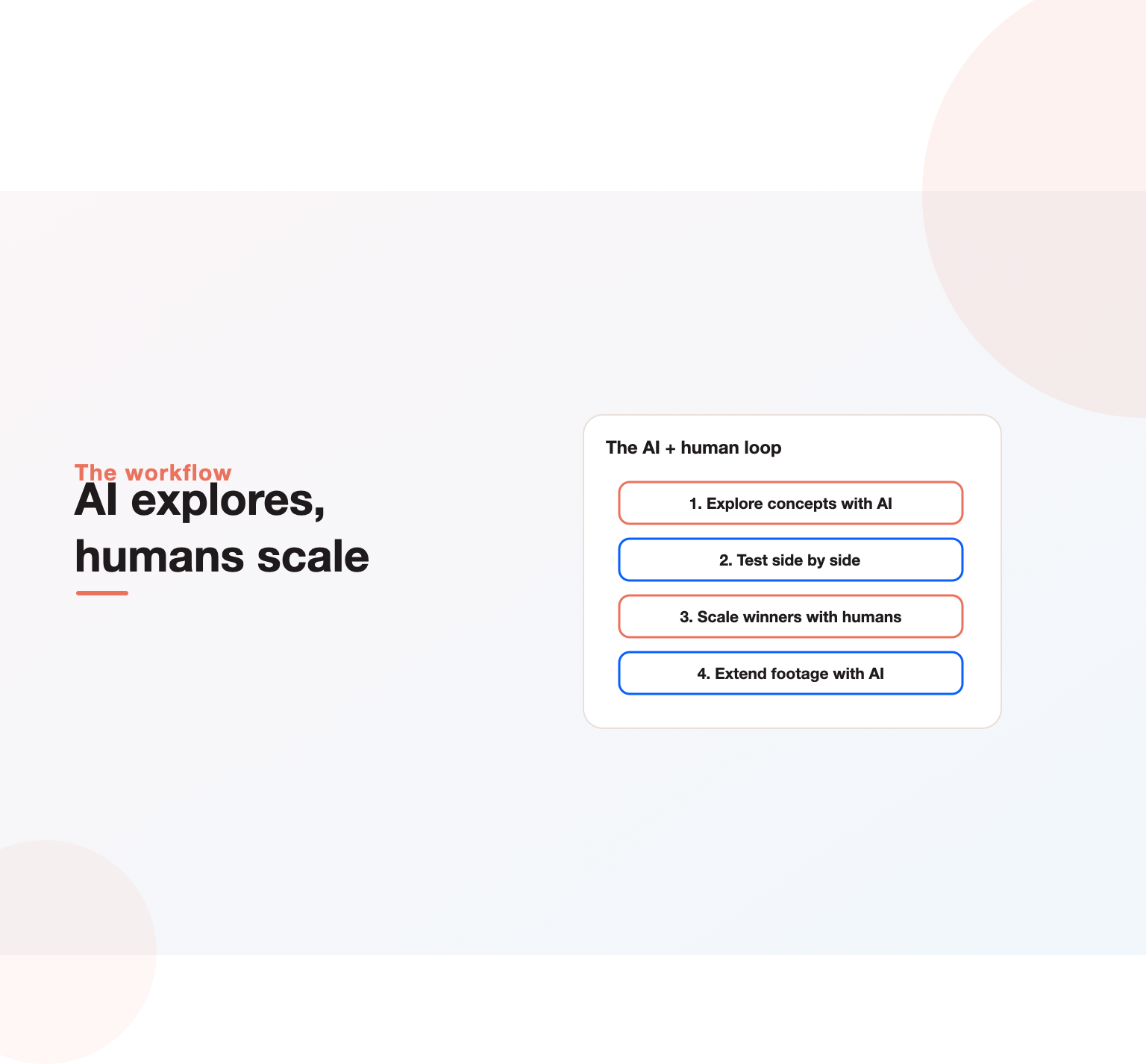
The data in our comparison makes the trade-off clear: AI is dramatically cheaper per ad, human creators are more credible. The best-performing setups use both.
- Explore with AI. Generate many concepts cheaply to learn which angles and hooks earn attention.
- Scale winners with humans. Once a concept proves itself, brief real creators or customers to film it for authenticity.
- Extend human footage with AI. Edit, caption, resize, translate and create variations of real videos.
This loop keeps costs low while preserving the trust that real people bring. It also gives creators sharper briefs, because the winning hook and angle are already known.
Choosing an AI video ads generator
- Output style: does it produce the look your audience responds to, such as UGC, polished product or explainer?
- Brand control: fonts, colours, logos, approved claims and voice.
- Credit economics: how many finished ads a plan really produces, including retries.
- Rights and likeness: commercial usage rights for avatars, voices, music and generated footage.
- Integrations: export to ad managers, asset libraries or direct publishing.
- Languages: quality of voices and lip sync in your target markets.
- Team features: seats, approvals and shared templates.
Start with a free plan or trial and produce the same three concepts in two tools. Compare output quality, editing time and cost per usable ad before committing.
Legal and brand safety checklist
- Confirm commercial rights for avatars, voices, stock, music and generated footage.
- Never use a real person’s likeness or voice without written consent.
- Do not present AI presenters as real customers or experts.
- Substantiate every claim, especially in health, finance and regulated categories.
- Follow each ad platform’s disclosure rules for AI-generated realistic content.
- Keep records of prompts, assets and approvals for each published ad.
AI video ads for small businesses and Indian brands
For small businesses, AI video ads remove the biggest barrier to video advertising: production cost. A local business can produce a month of short ads for less than the cost of a single professional shoot. Keep scripts simple, show the real product or place where possible, and use AI for captions, voiceover and resizing.
For Indian brands, multilingual output is the standout benefit. One proven script can be voiced and captioned in Hindi, Tamil, Telugu, Marathi, Bengali and English, with regional examples. Test lip sync and pronunciation with native speakers, and avoid avatars that look out of place for your audience. Short-video platforms and Instagram Reels are central in India, so 9:16 formats come first.
Common mistakes with AI video ads
- Letting the tool choose the idea. Templates create sameness. Bring your own insight.
- Weak hooks. If the first two seconds are generic, nothing else matters.
- Uncanny avatars in trust-sensitive categories. Use real people where credibility is critical.
- Ignoring credit limits. Budget for retries and higher tiers when testing at scale.
- Skipping review. Generated visuals can contain errors, odd details or claims you cannot support.
- Measuring edits instead of concepts. Roll results up by idea.
Where AI video ads are heading
Three trends are visible. Ad platforms are building generation directly into ad managers, so variations and resizing happen where ads are bought. Generative video models are improving quickly in realism and length, which will make product and lifestyle footage cheaper still. And personalisation at scale is coming: versions of an ad tailored to audience, location or language, generated automatically. For marketers, the constraint moves from production capacity to ideas, testing discipline and brand judgement.
If you want help building a creative testing system around AI video, our Meta ads team combines concept strategy, AI-assisted production and measurement. We also cover the wider picture in our guide to Facebook ad creative.
Methodology
On 31 October 2026 we visited the public pricing pages of AI video ad generators, AI avatar tools, generative video models, AI video editors and one human UGC service. For each tool with readable pricing we recorded the lowest paid plan, its monthly list price (or annual price where only that was shown), any free plan or trial, and what the entry plan includes. Twelve AI tools had readable published prices; Arcads and AdCreative.ai did not display readable pricing at the time, and Quickads showed only a trial price. Credit equivalents (such as seconds of video) are taken from vendor pages. We did not test output quality. Prices change frequently, so check vendor sites before buying. The dataset is available on request.
Key Takeaways
- AI video ads use generative AI for scripts, footage, avatars, voice and editing, making video advertising affordable for almost any team.
- In our comparison, 12 tools start between 9 and 36 dollars a month, with a median of 17.50 dollars, and five offer free plans.
- Entry plans buy limited output; real testing needs higher tiers, so model cost per usable ad.
- AI is far cheaper per ad than human UGC, which cost about 167 dollars per ad in the service we reviewed, but humans still win on trust.
- AI is best for exploring concepts and extending footage, and real people are best to scale proven winners.
Need a video creative system that scales? Talk to our team.
Frequently asked questions
What are AI video ads?
They are video advertisements made partly or fully with generative AI, including AI-written scripts, generated footage, AI avatars or actors, synthetic voiceovers and automated editing and resizing.
How much do AI video ad generators cost?
In our comparison, published entry plans ranged from 9 to 36 dollars a month, with a median of 17.50 dollars. Five tools offer free plans. Entry plans include limited credits, so frequent testing usually needs a higher tier.
Which AI video editor is best for ads?
It depends on the job. Creatify, Topview and Pencil focus on turning products into ad drafts; HeyGen, Synthesia and Captions specialise in avatars and presenters; Runway and Pika generate footage; Kapwing and VEED speed up editing of real video.
How do I create video ads with AI?
Start with customer research and three to five concepts, write strong hooks, generate drafts in an AI tool, edit for pacing and brand, adapt for each placement, review claims, then test concepts side by side and iterate on winners.
Do AI avatar video ads perform well?
They can, especially for explainers, multilingual versions and fast testing. In trust-sensitive categories, real people usually perform better. Never present an avatar as a real customer.
Do I need to disclose AI in video ads?
Disclosure rules vary by platform and country and are tightening. Major platforms label or require disclosure for realistic AI-generated people and scenes in many cases, so check current policies before launching.
Ready to put this into practice?
Talk to the team that runs SEO, AI search and paid growth programs every day.
Book a Strategy Call →