 Skip to content

AI Agents for Marketing: Use Cases, Rollout Plan and How 20 Platforms Price Them (2026)
AI agents for marketing explained: 12 use cases, a 60-day rollout plan, guardrails, and how 20 platforms including HubSpot, Salesforce and Intercom price their agents.
Quick Answer
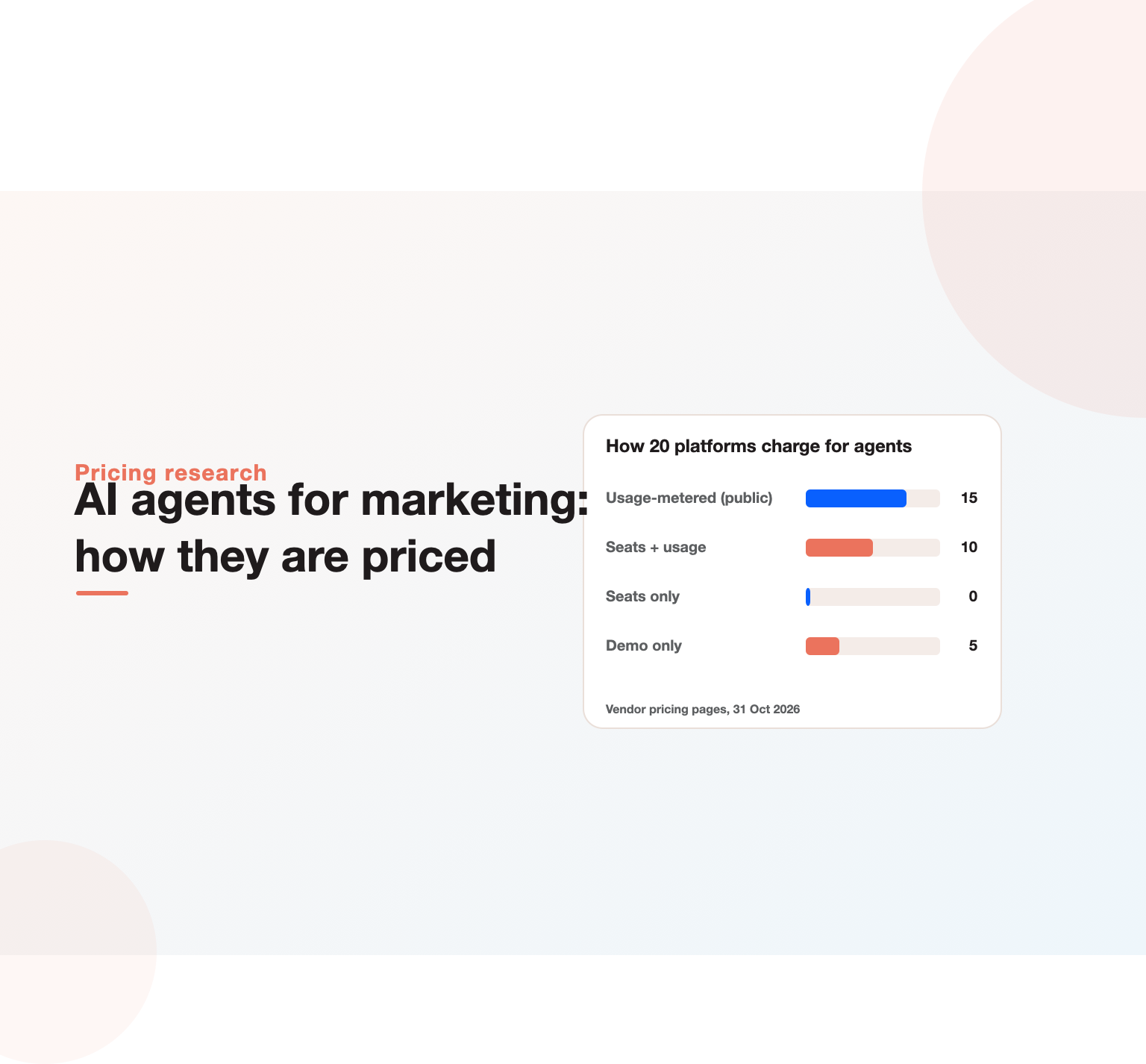
AI agents for marketing are software assistants that can plan and carry out multi-step marketing work on their own, such as researching prospects, drafting and personalising campaigns, answering website visitors, qualifying leads, publishing social posts and reporting results, using a language model connected to your tools and data. Unlike a chatbot that only answers, an agent takes actions inside systems such as your CRM, email platform or ad account, usually within rules you set. We reviewed how 20 marketing and sales platforms package their agents on 31 October 2026: every one of the 15 that publish pricing charges for agents by usage (credits, executions, conversations or outcomes), ten combine that with per-seat plans, and five sell agents only through a sales call.
Key Highlights
- An AI marketing agent combines a language model, access to your data and the ability to take actions in your tools.
- Most marketing suites now ship agents: HubSpot Breeze, Salesforce Agentforce, Jasper, Sprout Social, monday.com, Notion and Intercom among them.
- In our review of 20 platforms, all 15 with public pricing meter agents by usage; none sells agents on seats alone.
- Ten platforms combine seats with credits, so agent cost grows with how much work the agents do, not just how many people use them.
- Intercom charges 0.99 dollars per resolved outcome; Sprout Social includes 100 agent credits per seat; monday.com sells 1,000 credits for 10 dollars.
- The best first use cases are narrow, repeatable and measurable: lead research, inbound qualification, content repurposing and reporting.
What are AI agents for marketing?
A marketing team’s day is full of tasks that follow a pattern: research an account before outreach, turn a webinar into ten social posts, answer the same pricing question on the website, check yesterday’s campaign numbers and flag anything odd. Generative AI made the writing part faster. Agents go further: they can decide the steps, call the tools, check the result and continue, with a person approving where needed.
Three ingredients make something an agent rather than an assistant:
- A goal, not just a prompt. “Qualify every inbound demo request and book the good ones” rather than “write a reply to this email”.
- Access to context. CRM records, product information, brand guidelines, past campaigns and analytics.
- The ability to act. Creating records, sending messages, updating fields, publishing content or adjusting settings through connected tools.
Demand is rising quickly. “ai agents for marketing” draws around 1,100 searches a month in the US, “ai marketing agent” another 900, and related searches such as “ai agents for digital marketing” and “ai agents for marketing automation” are growing as vendors launch agent products.
The term is used loosely, which causes confusion when buying. Some vendors call any AI feature an agent; others reserve the word for systems that act on their own across several steps. A useful test is to ask what the agent does when something unexpected happens. A genuine agent will try another approach, ask for help or stop safely; a scripted feature simply fails. Another test is whether it can use more than one tool: reading from the CRM, checking the website and writing back a result in one run. Throughout this guide we use the stricter meaning, because that is where the real productivity gains, and the real risks, sit. It also explains why pricing is shifting to usage: an agent that takes ten actions to finish a task consumes more computing than a single text completion, and vendors pass that cost on.
AI agents vs chatbots vs automation
| Rule-based automation | Chatbot or AI assistant | AI agent | |
|---|---|---|---|
| How it decides | Fixed if-then rules | Responds to each prompt | Plans steps toward a goal |
| Handles new situations | No | In conversation only | Yes, within guardrails |
| Takes actions in tools | Yes, predefined | Rarely | Yes, chosen at run time |
| Typical example | Email nurture workflow | Drafting a blog intro | Researching and enriching 200 accounts, then drafting outreach |
Agents do not replace automation. The most reliable setups use classic workflows for predictable steps and agents for the parts that need judgement. If your marketing automation strategy is weak, adding agents will automate the confusion.
Our research: how platforms price AI marketing agents
Agent pricing is new and confusing, so we read the product and pricing pages of 20 marketing, sales and automation platforms on 31 October 2026 and recorded how each one charges for agents.
| Platform | How agents are charged | Published reference point |
|---|---|---|
| HubSpot Breeze | Prebuilt agents included in paid tiers; custom agents use HubSpot Credits | Paid plans from 7 dollars a month |
| Salesforce Agentforce | Flex Credits, per conversation, or per-user licences | Free to start |
| Jasper | Seats plus credits for agents | 59 to 69 dollars per seat a month |
| Copy.ai | Seats plus workflow credits | 1,000 dollars a month for 20,000 credits |
| Writer | Seats with fixed credit limits | 14-day free trial |
| Sprout Social | Agent credits included per seat | 100 credits per seat; 199 to 399 dollars per seat |
| monday.com | Seats plus credits | 1,000 credits for 10 dollars |
| Notion | Seats plus credits for custom agents | 10 dollars per 1,000 credits |
| Intercom Fin | Per outcome plus seats | 0.99 dollars per resolved outcome |
| Klaviyo | Usage allowance for AI features | Free plan includes 5 dollars of usage |
| Relevance AI | Credits | Tiered credit plans |
| Lindy | Credits | 50 dollars of free credits |
| Gumloop | Credits | From 37 dollars a month, 20,000 credits on Pro |
| n8n | Workflow executions plus AI credits | Free trial |
| Artisan | Credit volume plus dialer seats | Demo only |
| 11x, Qualified, Typeface, Salesloft, Iterable | Not published | Demo only |
What the pricing tells you
- Usage is the new unit. All 15 platforms that publish agent pricing meter it by usage: credits, executions, conversations or outcomes. None charges for agents on seats alone.
- Seats are not going away. Ten of the 15 combine usage with per-seat plans, so you pay for people and for the work agents do.
- Outcome pricing has arrived. Intercom charges per resolved conversation, and Salesforce offers per-conversation pricing. This shifts risk to the vendor, but makes forecasting harder.
- Credits are not comparable. One vendor’s credit is not another’s. A credit might be one model call, one action or one minute of work. Ask for a worked example of a typical task.
- AI sales agents are the least transparent. The AI SDR vendors in our list (11x, Qualified, Artisan) mostly sell through demos.
For budgeting, estimate tasks per month, multiply by the vendor’s cost per task, and add 30 percent for testing and retries. Our SaaS tech stack study shows how quickly tool costs pile up across a marketing team.
Not sure which marketing channels are worth your budget?
Our team reviews your current setup and shows you where the opportunities are. See how our digital marketing consulting work.
Twelve use cases that work today
1. Account and prospect research
An agent pulls company news, hiring signals, technology stack and recent funding into the CRM before a rep or marketer touches the account. This is the most widely adopted use case because it saves hours and the output is easy to check.
2. Inbound lead qualification
Website agents such as Qualified’s Piper or Intercom’s Fin answer visitor questions, ask qualifying questions and route good leads to a calendar. Our guide to AI lead generation covers how to set qualification rules.
3. Content repurposing
Turn one webinar, report or long article into social posts, newsletter sections, ad variations and sales snippets, in brand voice, for a human to approve.
4. Social media management
Sprout Social and Hootsuite now include agents that draft replies, summarise conversations and suggest posts. Keep a human approving anything public.
5. Email personalisation
Agents write tailored first lines or whole emails from CRM context. Klaviyo, HubSpot and Salesforce build this into their email tools.
6. Campaign reporting
An agent checks yesterday’s numbers across ad platforms and analytics, explains changes in plain language and flags anomalies. This replaces the Monday-morning spreadsheet ritual.
7. Ad creative variations
Agents generate copy and image variations for paid social and search. On Meta, variety of concepts matters more than volume of variations, as our Meta Andromeda analysis shows, so use agents to scale ideas a person has chosen.
8. SEO and AI search briefs
Agents compile search data, competitor pages and AI answer citations into content briefs. They are good at gathering; people still need to decide the angle.
9. Voice follow-up
Voice agents call or answer leads within seconds. Our comparison of AI voice agents covers costs and compliance.
10. Data hygiene
Agents deduplicate records, fill missing fields and standardise job titles, which improves every other system that depends on CRM data.
11. Competitive monitoring
An agent watches competitor websites, ad libraries and news, then sends a weekly digest. Pair it with manual checks of the LinkedIn ads library for B2B competitors.
12. Internal knowledge answers
Agents answer sales and support questions from approved marketing content, so the team stops asking where the latest deck is.
AI agents for marketing across the funnel
Mapping agents to funnel stages helps avoid gaps and overlaps.
| Stage | Agent jobs | Human jobs |
|---|---|---|
| Awareness | Draft social posts, repurpose content, generate ad variations, monitor mentions | Choose themes, approve public content, own brand voice |
| Consideration | Answer website questions, personalise emails, build comparison pages from approved facts | Define positioning, decide offers, review claims |
| Conversion | Qualify leads, book meetings, follow up instantly, enrich records | Set qualification rules, handle complex deals |
| Retention | Onboarding nudges, support answers, churn-risk alerts | Account strategy, relationship building |
| Measurement | Daily reporting, anomaly detection, data hygiene | Interpret results, set budgets and priorities |
Most teams find the biggest early gains in conversion and measurement, where tasks are repetitive and the definition of success is clear.
Worked example: building a lead research agent
Here is how a B2B team might build its first custom agent in an agent builder, step by step.
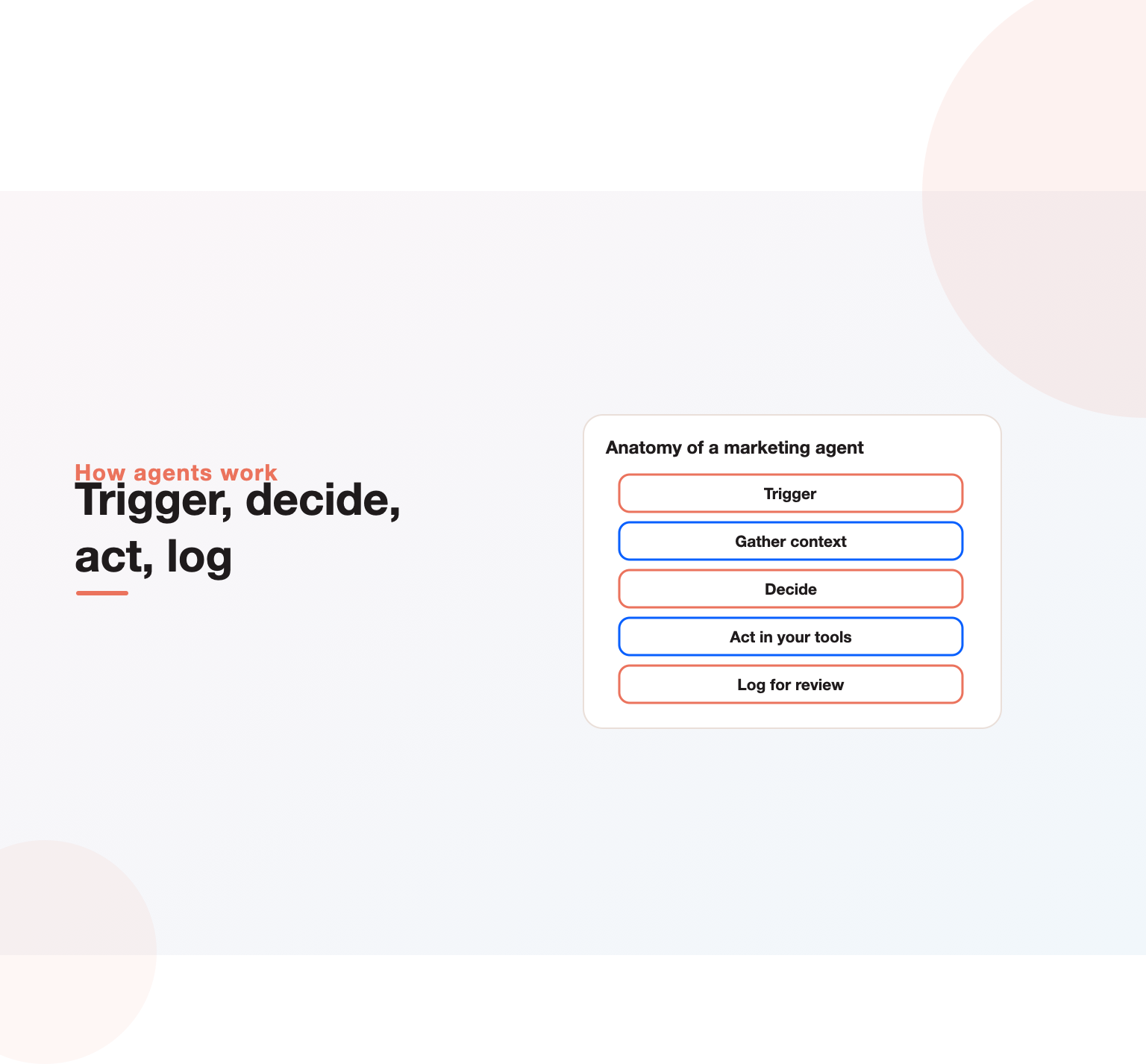
- Trigger. A new lead is created in the CRM with a company domain.
- Research. The agent reads the company website, recent news and job postings, and identifies industry, size, likely use case and any trigger events such as funding or a new marketing leader.
- Enrich. It writes a short summary and fills structured fields: industry, employee band, technologies mentioned and a fit score based on rules you define.
- Decide. If the fit score passes a threshold, it creates a task for a rep with three suggested talking points. If not, it adds the lead to a nurture list.
- Log. It records the sources it used so a person can check the reasoning.
In shadow mode, a marketer reviews the first 50 summaries and scores. Typical fixes at this stage are tighter fit rules, a list of sources to ignore and clearer formatting. Once accuracy is consistently high, the agent runs on every new lead, and the team spends its time on conversations rather than research. The same pattern, trigger, gather, decide, act and log, applies to almost every marketing agent.
Built-in agents vs agent builders
There are two ways to adopt AI agents for marketing. The first is to switch on agents inside tools you already pay for: HubSpot, Salesforce, Sprout Social, monday.com or Notion. The second is to build custom agents in a platform such as Relevance AI, Lindy, Gumloop, n8n or Zapier, connecting several tools together.
| Built-in agents | Agent builders | |
|---|---|---|
| Setup time | Hours | Days to weeks |
| Flexibility | Limited to that tool | Cross-tool, custom logic |
| Data access | Native to the platform | Through connectors and APIs |
| Who maintains it | The vendor | Your team or an agency |
| Best for | Common tasks in one system | Workflows that span several systems |
Start with built-in agents where they exist, because the data and permissions are already in place. Move to builders when a valuable workflow crosses tools, for example research in one place, enrichment in another and outreach in a third.
The best AI agents for marketing by team
Choice depends on the system of record you already use and the work you want to hand over.
- HubSpot teams: start with Breeze agents for prospecting, content and customer support. HubSpot says prebuilt agents are included in paid editions and only custom agents consume credits.
- Salesforce teams: Agentforce covers marketing, sales and service, with three pricing options: Flex Credits, per conversation or per user.
- Content-heavy teams: Jasper and Writer focus on brand-safe content agents with governance features.
- Social teams: Sprout Social includes agent credits per seat.
- Website conversion: Intercom Fin and Qualified handle visitor conversations; Fin’s published price is per resolved outcome.
- Cross-tool workflows: Zapier, n8n, Gumloop, Lindy and Relevance AI let operations teams build their own.
For a broader list of AI tools beyond agents, see our guide to AI tools for digital marketing.
How to roll out AI marketing agents in 60 days
- Weeks 1 and 2: pick one workflow. Choose a task that happens at least weekly, takes real time, and has a clear right answer. Account research and inbound qualification are good candidates.
- Weeks 2 and 3: document the process. Write the steps a good marketer follows, the data needed, the rules and the definition of done. This becomes the agent’s instructions.
- Weeks 3 to 5: run in shadow mode. The agent does the work, a person reviews every output, and nothing goes to customers without approval. Track accuracy.
- Weeks 5 to 7: allow limited autonomy. Once accuracy is high, let the agent act on low-risk items and keep review for the rest.
- Week 8: measure and decide. Compare hours saved, quality and cost per task against the baseline. Expand, adjust or stop.
Questions to ask agent vendors
- What exactly counts as one credit, conversation or outcome, and what does a typical task in our workflow cost?
- Which actions can the agent take, and can we restrict them?
- How do approvals work, and can we require them for specific actions?
- Where is our data processed and stored, and is it used to train models?
- What logs and audit trails are available?
- How does the agent handle uncertainty: does it ask, escalate or guess?
- What happens when usage exceeds our plan, and can we cap spend?
AI agents for small businesses and Indian teams
Small teams often gain the most, because one agent can cover work that would otherwise need a hire. The practical route is to pick one platform you already use, switch on its built-in agents and focus on two jobs: answering enquiries quickly and following up every lead. Usage-based pricing helps here, because costs stay low while volumes are small.
In India, two extra considerations apply. WhatsApp is often the main customer channel, so check that agents can work there through an approved business provider and respect opt-in rules. Language matters too: many buyers mix English with Hindi or regional languages, so test agents on real customer messages before going live. Data protection obligations under India’s Digital Personal Data Protection Act also apply to the personal data agents process, so keep consent records and limit what data agents can see.
Guardrails every marketing agent needs
- Least-privilege access. Give agents only the permissions the task needs; read-only where possible.
- Approval gates for anything customer-facing, any spend change and any deletion.
- Brand and claims rules. Supply approved messaging, banned claims and tone guidelines.
- Consent and privacy. Respect opt-outs and data protection rules for every message an agent sends. Outbound voice and SMS carry extra legal requirements in many countries.
- Logging. Keep a record of what each agent did and why, so mistakes can be traced and fixed.
- Budget caps. Usage pricing means a runaway loop can burn credits. Set monthly limits and alerts.
Example: an agent budget for a five-person marketing team
Usage pricing makes budgets feel abstract, so here is an illustrative calculation using published reference points from our research. Treat it as a method, not a quote.
- Website conversations: if a website agent resolves 400 conversations a month at 0.99 dollars per resolved outcome, that is about 396 dollars a month, plus any seat fees.
- Social agent: on a plan that includes 100 agent credits per seat, five seats provide 500 credits a month at no extra cost; heavy use may need more.
- Workspace agents: at 10 dollars per 1,000 credits, a team using 5,000 credits a month for research and summaries spends about 50 dollars.
- Custom workflow builder: an entry plan from around 37 dollars a month covers a handful of custom agents at low volume.
Even with a buffer for testing, many small teams can run several useful agents for a few hundred dollars a month. The bigger cost is usually the time to design, test and maintain workflows. Budget that time explicitly, because AI agents for marketing that nobody owns tend to drift and break as tools and data change.
Want a marketing plan built around your numbers?
Book a free 30-minute strategy call and leave with a clear next step for your business.
How AI agents for marketing change team roles
Teams that adopt agents well tend to add three responsibilities rather than remove people. An agent owner for each workflow keeps instructions current, reviews samples and tracks accuracy. A marketing operations lead manages permissions, integrations, data quality and costs across all agents. And reviewers, usually the specialists who used to do the task, check outputs and teach the agent through better instructions and examples.
The skills that become more valuable are process mapping, clear writing of instructions and rules, data literacy and judgement about what should stay human. Content strategists, for example, spend less time drafting and more time on ideas, research and editing. Demand generation managers spend less time pulling reports and more time deciding what to do about them. Our guide to B2B marketing automation covers the operations foundations these roles rely on.
Leaders should also set expectations. Agents will make mistakes, especially early. A culture where people report and fix errors quickly, rather than quietly working around the agent, is what turns a pilot into a durable capability.
Measuring the return
Track agents like any other team member, with a few extra measures:
- Time saved per task and total hours returned to the team each month.
- Accuracy rate: the share of outputs accepted without edits.
- Cost per task from credits or usage, compared with the human cost.
- Business outcomes: meetings booked, pipeline created, response times and conversion rates.
- Escalation rate: how often the agent hands over to a person, and whether those hand-offs were right.
Tie these to your attribution model so agent-driven activity shows up in revenue reporting; our guide to marketing attribution explains how.
Data foundations agents depend on
Agents are only as good as the data they can read. Before scaling, check three things. First, the CRM: duplicate records, missing fields and inconsistent lifecycle stages will mislead any agent. Second, content: agents need an approved library of product facts, positioning and proof points. Third, integrations: agents need reliable connections to email, ads, analytics and the website. A customer data platform or a clean CRM often matters more than the choice of agent vendor. If your stack has grown untidy, a martech audit is the right first step.
An agent readiness checklist
Before switching on your first agent, check these ten points. Teams that can answer yes to most of them usually see results within a quarter.
- We have picked one workflow with a clear owner and a measurable outcome.
- The current process is written down step by step, including edge cases.
- CRM data for that workflow is reasonably clean: few duplicates, key fields filled.
- We have an approved library of product facts, positioning and proof points.
- We know which actions the agent may take alone and which need approval.
- Consent and opt-out status is recorded and respected for every contact the agent may message.
- We have estimated monthly usage and set a spend cap with alerts.
- There is a baseline: how long the task takes today and how well it is done.
- A reviewer has time each week to check samples during the first month.
- We have agreed what success looks like after 60 days and what happens if we miss it.
If fewer than half of these are true, spend the first month on foundations. Cleaning data and documenting processes pays off whether or not you adopt agents, and it makes every later rollout faster and safer.
Common mistakes with AI agents for marketing
- Starting with the hardest problem. Fully autonomous campaign management is not a first project. Start narrow.
- Skipping the process write-up. If people cannot describe the task clearly, an agent cannot do it reliably.
- Letting agents publish unreviewed. One wrong claim in a public post or customer email can cost more than the agent saves.
- Ignoring usage costs. Credit-based pricing scales with volume; model the cost before switching agents on across the database.
- Buying overlapping agents. Several tools may now offer similar agents. Pick one owner per task.
- Measuring activity, not outcomes. Thousands of drafted emails mean nothing if meetings and pipeline do not move.
Where AI agents for marketing are heading
Three shifts are visible in vendor roadmaps and pricing pages. First, agents are moving from single tasks to coordinated teams: a research agent hands to a writing agent, which hands to a review agent. Second, pricing is moving toward outcomes, as Intercom and Salesforce already show. Third, agents are learning to work across vendors through open protocols, so a marketing agent in one platform can act in another. For marketers, the skill that grows in value is not prompting but process design: knowing which work to hand over, how to check it and how to measure it.
Agents will also change how buyers find vendors. As buyers use AI assistants to shortlist suppliers, your brand’s presence in AI answers matters; our research on which agencies AI recommends shows how inconsistent those answers can be.
Do you need an agency or can you do it in-house?
Most teams can switch on built-in agents themselves. Help is worth it when workflows span several systems, when data needs cleaning first, or when you want a measured rollout with clear guardrails. Our digital marketing consulting team designs and implements agent workflows alongside the automation and data work they depend on.
Methodology
On 31 October 2026 we visited the public product or pricing pages of 20 marketing, sales and automation platforms that sell AI agents or agent features. For each, we recorded how agent usage is charged (seats, credits, executions, conversations or outcomes), any published price point, and whether pricing is public or only available through sales. Classification is based on what each vendor states on its own pages; where a vendor offers several models, we list them. We did not test the agents’ performance. Prices and packaging change frequently, so check vendor sites before buying. The dataset is available on request.
Not ready for agents yet? Start with our guide to using ChatGPT for marketing, including a 30-day rollout plan.
For outbound sales specifically, see AI cold calling: legality, costs and tools.
Key Takeaways
- AI agents for marketing plan and carry out multi-step tasks in your tools, within rules and approvals you set.
- In our review of 20 platforms, every vendor with public pricing meters agents by usage, and ten combine that with seats.
- Start with narrow, measurable workflows such as account research and inbound qualification.
- Use built-in agents first, and agent builders when workflows cross tools.
- Guardrails, clean data and outcome-based measurement matter more than the choice of vendor.
Want help choosing and rolling out your first marketing agents? Talk to our team or explore our lead generation services.
Frequently asked questions
What are AI agents for marketing?
They are AI systems that can plan and complete multi-step marketing tasks, such as researching accounts, qualifying leads, drafting campaigns and reporting, by using a language model connected to your data and tools.
How much do AI marketing agents cost?
Most vendors charge by usage. In our review, examples ranged from 10 dollars per 1,000 credits (monday.com and Notion) to 0.99 dollars per resolved conversation (Intercom Fin), usually on top of per-seat plans. Several AI SDR vendors only quote through sales.
Can I create AI agents for marketing myself?
Yes. Built-in agents in HubSpot, Salesforce, Sprout Social or monday.com can be set up in hours. For custom, cross-tool agents, builders such as Zapier, n8n, Gumloop, Lindy or Relevance AI let operations teams create their own without heavy coding.
Will AI agents replace marketers?
They replace tasks, not judgement. Agents handle research, first drafts, routing and reporting, while people set strategy, choose ideas, approve customer-facing work and own results.
What is the best first use case?
A frequent, time-consuming task with a clear right answer, such as account research before outreach or qualifying inbound demo requests.
Are AI agents safe to use with customer data?
They can be, with least-privilege access, approval gates, logging and compliance with consent and data protection rules. Check where each vendor processes and stores data before connecting it.
Ready to put this into practice?
Talk to the team that runs SEO, AI search and paid growth programs every day.
Book a Strategy Call →