 Skip to content

LinkedIn Ads Library: How to Use It, Plus Which B2B Brands Advertise Most (2026)
How to use the LinkedIn ads library to research competitor ads, every filter explained, plus our count of live LinkedIn ads from 70 leading B2B software brands.
Quick Answer
The LinkedIn ads library is LinkedIn’s free, public database of every ad that has run on the platform since 1 June 2023. Anyone can open it at linkedin.com/ad-library, with no login, and search by company, payer, keyword, country and date to see the ad creative, format and advertiser. Ads stay listed for a year after their last impression, and ads shown in the European Union also carry impression ranges and targeting details. We searched it for 70 leading B2B software brands on 31 October 2026 and found that the ten most active advertisers ran 60 percent of all the ads, that more than a third of ads mentioned AI, and that only 1.4 percent asked for a demo.
Key Highlights
- The LinkedIn ads library is public, free and needs no LinkedIn account to search.
- It covers ads served after 1 June 2023 and keeps each ad for one year after its last impression.
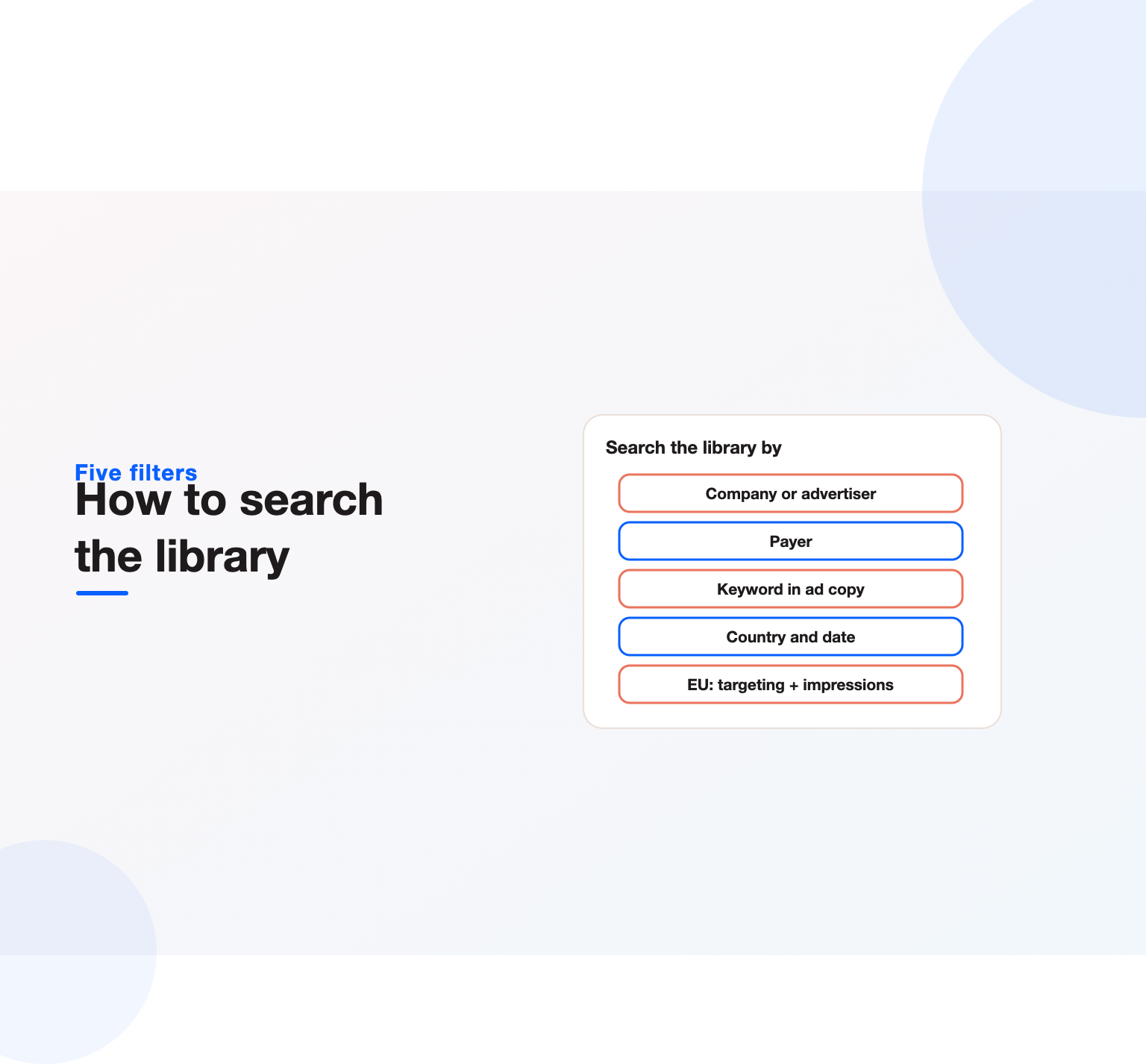
- You can filter by company or advertiser, payer, keyword, country and date range.
- EU-targeted ads show extra transparency data: impression ranges, targeting parameters and run dates.
- Our research: 69 leading B2B brands ran an estimated 71,000 LinkedIn ads in 30 days; the top ten ran 60 percent of them.
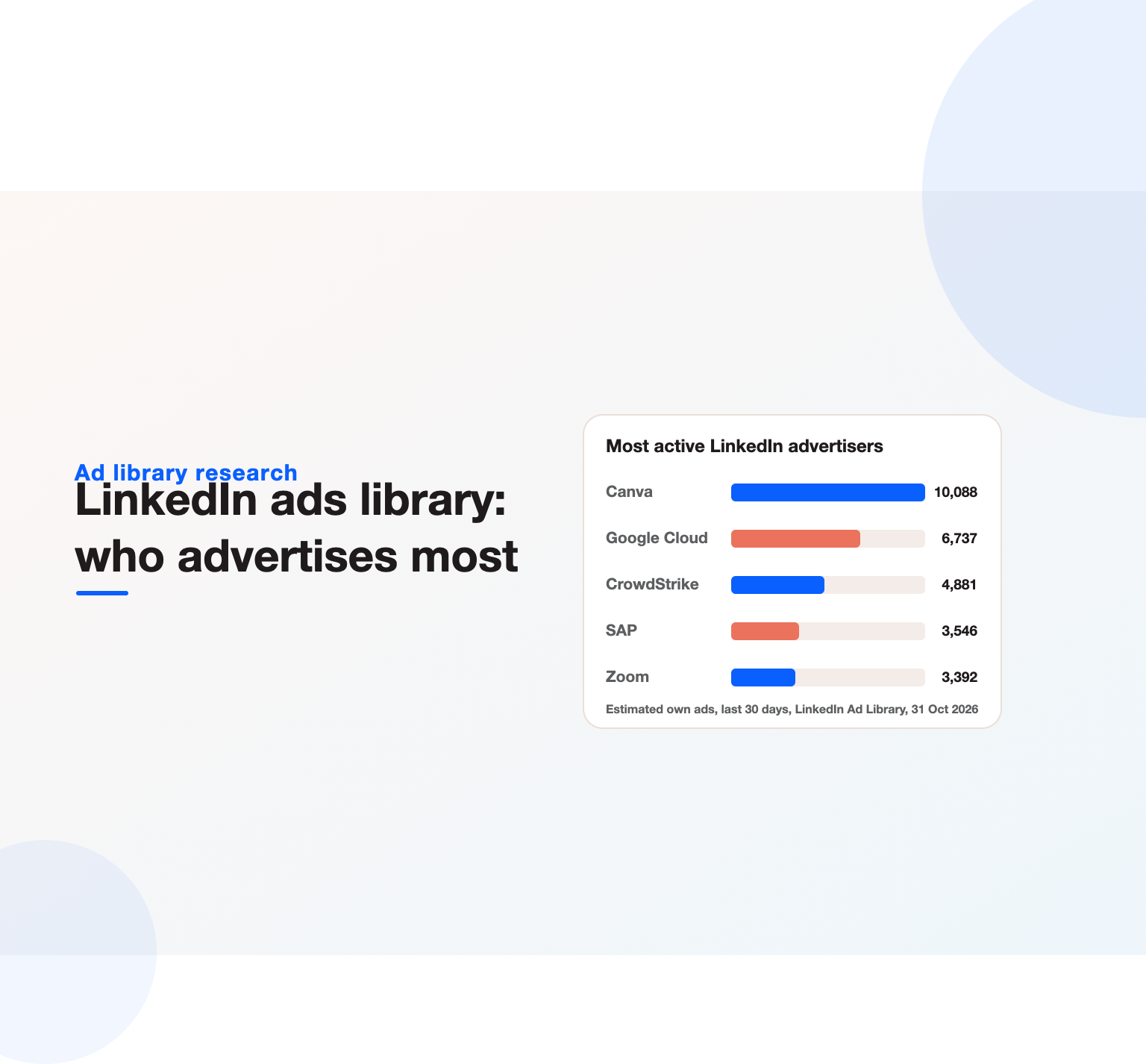
- Canva, Google Cloud, CrowdStrike, SAP and Zoom were the most active advertisers; sales-tech brands ran the fewest.
What is the LinkedIn ads library?
The ad library launched in 2023 as part of its response to the EU Digital Services Act, which requires very large online platforms to keep a searchable repository of the ads they serve. The company chose to make the repository global, so a marketer in Ohio, Bengaluru or Berlin sees the same tool. According to LinkedIn’s own help documentation, each entry includes an ad preview, the ad format, the advertiser name, the payer name and whether the ad is restricted.
For a B2B marketer, that makes the LinkedIn ads library the only first-party window into what competitors are actually paying to show decision-makers. Third-party “spy tools” scrape fragments of this data; the library is the source. It does not show spend, click-through rates or conversion data, and for ads outside the EU it does not show targeting. What it does show is enough to reverse-engineer a competitor’s messaging, offers, formats and cadence.
Demand for the tool has grown with awareness. “linkedin ad library” draws about 2,700 searches a month in the US and around 10,000 globally, with India the single largest market. The related phrase “ad library linkedin” adds a few hundred more, and long-tail searches such as “linkedin ad library search” and “linkedin ad library api” show that people want both the manual and the programmatic route.
How to access the LinkedIn ads library
Getting in takes seconds:
- Go to linkedin.com/ad-library/home. You do not need to sign in.
- Type a company or advertiser name in the first box, or a keyword in the second.
- Optionally pick a country and a date range (last 30 days, current month, current year, last year or a custom range).
- Press Search. Results appear as cards, newest first by default.
- Select “View details” on any card to open the ad on its own page with format, advertiser, payer and, for EU ads, impressions and targeting.
Each search returns a total count at the top (“2,622 ads match your search criteria” for HubSpot when we looked). That count is the quickest signal of how hard a company leans on LinkedIn advertising, and it is the number we used in our research below.
Every filter in the LinkedIn ad library search, explained
LinkedIn ad library search has five standard filters and two extra ones for EU ads. Knowing what each one really matches saves a lot of confusion.
Company or advertiser
This matches the name of the LinkedIn Page that the ad runs from. It is a text match, not an exact entity match, so searching “HubSpot” also returns ads from partner agencies whose Page names contain the word, and ads that HubSpot co-promotes with partners. When you research a competitor, open a few results and confirm the advertiser before you draw conclusions.
Payer
The payer is the entity that funded the ad. Usually it matches the advertiser. When it does not, you have found something useful: an agency, a parent company or a co-marketing partner paying for the placement. Searching by payer is the fastest way to see every brand an agency runs ads for.
Keyword
Keyword search matches text inside the ad copy. It is the most underused filter. Search “SOC 2”, “free trial”, “webinar” or a competitor’s product name and you see every advertiser using that message, which is far more useful than looking at one company at a time.
Country
Country filters by where the ad was served. Use it to see whether a competitor localises copy for the UK, Germany or India, or simply runs one global campaign.
Date range
Date filters show ads that were live during the window. “Last 30 days” is the best proxy for what a company is running now.
Impressions and targeting (EU only)
For ads served in the European Union, the “More” menu adds impression ranges and targeting parameters such as language, location, company size, job function and seniority. This is the closest thing to seeing a competitor’s audience settings, and it only exists because of EU law. If a competitor sells in Europe, their EU ads are the most informative entries in the whole library.
What the LinkedIn ads library shows, and what it hides
| Data point | All ads | EU-targeted ads |
|---|---|---|
| Ad creative preview | Yes | Yes |
| Ad format | Yes | Yes |
| Advertiser and payer | Yes | Yes |
| Run dates | Partial | Yes |
| Impression range | No | Yes |
| Targeting parameters | No | Yes |
| Spend, CTR, conversions | No | No |
Restricted ads are the exception: to comply with the law, LinkedIn hides the preview, advertiser and payer for them. You will occasionally see a card with almost nothing on it; that is why.
Not sure which marketing channels are worth your budget?
Our team reviews your current setup and shows you where the opportunities are. See how our digital marketing consulting work.
Which B2B brands advertise most on LinkedIn: our research
Most guides explain the buttons. We wanted to know what the LinkedIn ads library actually reveals about how B2B software companies use the channel, so we searched it for 70 well-known B2B and SaaS brands across CRM, sales tech, collaboration, security, data, fintech and martech.
The headline numbers
- The 69 brands we could measure ran an estimated 71,000 ads from their own LinkedIn Pages in the 30 days to 31 October 2026.
- The median brand ran about 349 ads in that window; 15 brands ran fewer than 100.
- The ten heaviest advertisers accounted for 60 percent of all ads. Canva alone ran an estimated 10,000.
- Of 1,272 brand-owned ads we read, 38 percent mentioned AI or AI agents, 9 percent offered a report, guide or survey, 3 percent promoted an event, and only 1.4 percent asked for a demo.
- About 14 percent of the results for a company search came from a different advertiser with a similar name.
The 20 most active B2B advertisers in the LinkedIn ads library
| Rank | Brand | Category | Estimated own ads, last 30 days |
|---|---|---|---|
| 1 | Canva | Creative and marketing | 10,088 |
| 2 | Cloud and productivity | 6,737 | |
| 3 | CrowdStrike | Security | 4,881 |
| 4 | SAP | ERP | 3,546 |
| 5 | Zoom | Collaboration | 3,392 |
| 6 | Adobe | Creative and marketing | 3,140 |
| 7 | Snowflake | Data and infra | 2,925 |
| 8 | Rippling | HR and finance | 2,636 |
| 9 | Microsoft | Cloud and productivity | 2,591 |
| 10 | Atlassian | Collaboration | 2,429 |
| 11 | ZoomInfo | Sales tech | 2,063 |
| 12 | Twilio | Data and infra | 1,907 |
| 13 | Palo Alto Networks | Security | 1,902 |
| 14 | Workday | HR and finance | 1,580 |
| 15 | DocuSign | Collaboration | 1,492 |
| 16 | Shopify | Commerce and payments | 1,248 |
| 17 | monday.com | Collaboration | 1,082 |
| 18 | ServiceNow | IT and workflow | 1,080 |
| 19 | Figma | Creative and marketing | 1,069 |
| 20 | Contentsquare | Martech | 1,014 |
Canva, Google (through Google Cloud), CrowdStrike, SAP and Zoom lead the list. Security vendors stand out as a group: CrowdStrike, Palo Alto Networks and Zscaler all ran close to or above a thousand ads. These are companies selling to IT and security buyers who spend a lot of time on LinkedIn, and they test creative at scale.
Which categories advertise most
| Category | Brands | Median estimated ads, last 30 days |
|---|---|---|
| Creative and marketing | 3 | 3,140 |
| Data and infra | 5 | 908 |
| Security | 5 | 877 |
| HR and finance | 6 | 715 |
| CRM | 4 | 328 |
| Customer service | 3 | 313 |
| Collaboration | 13 | 210 |
| Martech | 13 | 198 |
| Sales tech | 10 | 66 |
The surprise is sales technology. The companies that sell pipeline tools, Gong, Salesloft, ZoomInfo, Apollo.io, 6sense, Demandbase and others, had a median of about 67 ads, the lowest of any category. Security vendors had a median of 877. Several sales-tech brands rely on founder and employee content, events and outbound rather than a large paid catalogue, and the library makes that visible.
What the ads say
AI dominates the message. More than a third of the brand-owned ads we read mentioned AI or agents, across every category from HR to security. Very few asked directly for a demo. Most opened with a claim or a stat and pointed to a product page, a report or an event. If your LinkedIn ads lead with “Book a demo”, you are now in a small minority, which may be an opportunity or a warning, and is worth testing.
Brands we could not find
For Oracle, Loom, Clay and Drift, the newest results for the name came entirely from other advertisers, such as the Quest Oracle Community and Loomis, Sayles. Drift was folded into Salesloft, so its absence is expected. Mailchimp and Hotjar returned no results, and Calendly returned two. A missing brand does not always mean zero ads: some companies advertise from product or regional Pages with different names.
LinkedIn ad examples from the library
Numbers show who is advertising. The creative shows how. These examples come straight from the LinkedIn ads library entries we read for our research, and each one illustrates a pattern worth copying in structure, not in words.
HubSpot: lead with original research
HubSpot’s newest ads promoted a survey it ran with the partner Aptitude 8 among 200 senior decision-makers, one ad on how cautious teams use AI and another on how companies manage their CRM. The ad does not sell software at all. It sells a finding, and the software comes later. This is the clearest example of why research-led offers work on LinkedIn: a statistic in the first line earns the click that a feature list would not.
Gong: teach the buying decision
Gong’s ads offered a framework for revenue jobs to be done and a guide to choosing a revenue AI platform, including a build-versus-buy explainer delivered as a document. Each one answers a question a buyer asks before talking to sales. Document ads like these collect leads while also shaping the evaluation criteria in Gong’s favour.
ZoomInfo: borrow a customer’s voice
ZoomInfo ran short video ads in which a founder of a customer company argues whether AI should replace a sales development team. The brand stays in the background and the customer carries the argument. It is a strong format for a crowded category, because a peer’s opinion is more credible than a vendor’s claim.
monday.com: localise the offer
monday.com ran a German-language series on AI agents for marketing teams, including a marketing playbook and a list of workflows that agents can take over. Country filters in the library make this kind of localisation easy to spot, and it shows that the largest advertisers treat each market as its own campaign.
Rippling: go beyond the core product
Rippling promoted a fintech guide to accepting stablecoin payments and a third-party report on digital assets. Those offers target finance leaders, a buyer adjacent to its HR roots, and show a brand using paid content to open a new audience.
Security vendors: events and threat education
Zscaler promoted a regional event on securing AI traffic and agentic workflows, while CrowdStrike mixed AI threat education with customer stories. Both use LinkedIn to educate a technical buyer about a new risk before selling the answer.
The common thread is that the best performers rarely ask for a meeting in the ad. They offer a useful idea, a piece of data or an event, and let the landing page do the selling. Our guide to B2B conversion rate optimization covers that second half, and our notes on AI lead generation show how teams follow up once the lead arrives.
How to use the LinkedIn ads library for competitor research
A count tells you who is spending attention. The creative tells you why. Here is the workflow we use with clients before we plan a campaign.
1. Build a list of five to ten competitors
Include direct competitors, the category leader and one or two adjacent tools your buyers also evaluate. Look up each one with “Last 30 days” and note the ad count. A competitor with hundreds of live ads is testing heavily; one with five is either new to the channel or has found a small set of winners.
2. Sort the creative into themes
Open the 20 most recent ads for each competitor and tag every one: product feature, pain point, proof (customer logo or stat), gated content, event or webinar, hiring or brand. Within an hour you will see each competitor’s message mix, and where all of them sound the same.
3. Note the formats
Single image, carousel, video, document, event, conversation and thought leader ads each signal a different funnel stage. A competitor running mostly document ads is collecting leads with gated content; one running thought leader ads is boosting executive posts for reach.
4. Read the offers
Write down every call to action: demo, trial, report, benchmark, template, webinar, assessment. Offers are where most B2B ads win or lose. If every competitor offers “Book a demo”, a useful benchmark report or calculator will stand out in the same feed.
5. Check longevity
Ads that keep appearing across months are usually the ones that work. Widen the date range and look for creative that repeats; advertisers rarely keep paying for losers.
6. Look at EU ads for targeting clues
If a competitor sells into Europe, open their EU ads and read the targeting parameters. Job functions, seniority and company size tell you exactly which buying committee they are chasing.
7. Turn findings into a brief
Summarise each competitor in three lines: main message, main offer, main format. Then write down the gap you will occupy. That one page is worth more than any amount of screenshots.
If you want this done as part of a full paid social plan, our LinkedIn ads team runs exactly this audit before every new account.
LinkedIn ad library search tips most marketers miss
- Search by keyword, not only by company. A keyword search for a pain point (“pipeline visibility”, “month-end close”) shows every vendor fighting for that buyer, including ones you did not know about.
- Look up your own brand. Partners, resellers and affiliates sometimes run ads with your name in them. The library is the quickest way to find them.
- Use the payer field to map agencies. Agencies often pay for ads on behalf of several clients. One payer search can reveal a whole client list.
- Use country filters to spot launches. A sudden cluster of ads in one country often signals market entry.
- Bookmark search URLs. Every search is a plain URL with parameters (for example accountOwner and dateOption), so you can save a competitor view and reopen it each month.
- Check “View details” for the format. Cards show the creative; the detail page confirms whether it is a document, video or carousel ad.
The LinkedIn ad library API
LinkedIn also offers programmatic access. The LinkedIn Marketing API documentation describes an Ad Library API that returns ad metadata for research and compliance use. Access requires a developer application and approval, and LinkedIn limits who can use it. For most marketing teams the web interface is enough. The API matters if you track dozens of competitors every week or feed ad data into a dashboard.
Searches for “linkedin ad library api” and “linkedin ad library scraper” show that people try to automate this. Be careful: scraping the web interface at high speed gets rate limited quickly, and it may breach LinkedIn’s terms. We ran our own searches slowly and manually paced for exactly that reason.
LinkedIn ad library transparency: why it exists
The EU Digital Services Act obliges very large online platforms to publish a searchable ad repository that shows who paid for an ad, what it said, when it ran and who it was aimed at. Transparency features in the LinkedIn ad library, such as targeting parameters and impression ranges, exist for EU ads because of that obligation. Outside the EU, LinkedIn shows less.
That is why searches like “linkedin ad library transparency center” have appeared: people expect a Google-style transparency hub. LinkedIn’s version is simpler but covers more B2B advertisers than any other public source.
LinkedIn ads library vs Meta Ad Library vs Google Ads Transparency Center
| Feature | Meta | ||
|---|---|---|---|
| Login needed | No | No | No |
| Coverage starts | June 2023 | 2018 (political), all active ads | 2023 |
| Keyword search in ad copy | Yes | Yes | Limited |
| Payer shown | Yes | For some categories | Yes |
| Targeting shown | EU only | EU only | Partial |
| Best for | B2B messaging and offers | Consumer creative | Search and YouTube ads |
If you also advertise on Meta, our guide to the Meta Ads Library covers the same workflow there, and Google’s Ads Transparency Center does the job for search and YouTube.
Want a marketing plan built around your numbers?
Book a free 30-minute strategy call and leave with a clear next step for your business.
What to look for in competitor creative
Looking at ads is easy. Learning from them takes a checklist:
- The first line. The feed truncates intro text, so the first 150 characters carry the ad. Note how competitors open: a stat, a question, a bold claim or a customer quote.
- The visual. Product screenshots, people, charts or plain text. B2B feeds are crowded with product screenshots, so a clear chart often stands out.
- Proof. Logos, review scores, analyst badges, customer numbers.
- The offer and form. Gated report, demo, trial, event. Lead gen form ads appear as document or single image ads with a form call to action.
- Voice. Formal, playful, founder-led or data-led. Your voice should be distinct from the three loudest competitors.
How to turn library research into better LinkedIn ads
Research only pays when it changes the campaign. Four moves work reliably:
- Own an unclaimed message. If every competitor talks about AI, talk about time to value or integration depth.
- Offer something they do not. If nobody publishes a benchmark, publish one. Original data earns clicks and shares; see how we used it in our SaaS tech stack study.
- Match proven formats, change the content. If document ads dominate your category, they probably convert. Use the format with a better document.
- Test against the leader’s angle. Run one ad that answers the market leader’s main claim directly. It often outperforms generic copy.
Pair the creative with a sensible measurement plan. Our guide to marketing attribution explains how to credit LinkedIn properly when deals close months later.
Ad formats you will see in the LinkedIn ads library
- Single image ads: the default sponsored content format and the most common in the library.
- Carousel ads: two to ten swipeable cards, used for feature tours and step-by-step stories.
- Video ads: product demos, customer stories and short brand spots.
- Document ads: PDFs readers can page through in the feed, often gated with a lead gen form.
- Event ads: promote a LinkedIn Event or webinar.
- Thought leader ads: boosted posts from employees or executives, increasingly common in B2B.
- Conversation and message ads: sent to inboxes; these appear in the library as well.
- Text and spotlight ads: small right-rail placements on desktop.
LinkedIn’s marketing solutions site lists the full set with specifications.
Using the library for B2B demand generation
LinkedIn is where B2B buying committees spend professional time, which is why the library is so dense with software companies. For a demand generation team, the library answers three planning questions: which problems competitors are educating the market about, which content offers they use to capture demand, and how often they refresh creative. Combine that with your own pipeline data and you have the basis of a quarterly plan. Our B2B demand generation guide goes deeper on the planning side.
It also helps with channel mix. If competitors are heavy on LinkedIn and absent from Reddit, there may be cheaper attention elsewhere; our Reddit ads examples show what B2B brands do there, and our ChatGPT ads research tracks the newest paid channel.
Common mistakes when using the LinkedIn ads library
- Treating ad count as spend. A company with 500 ads may spend less than one with 20 large, always-on campaigns. Count shows testing volume, not budget.
- Ignoring partner noise. Advertiser search is a text match. Partner and co-marketing ads inflate counts for big platforms.
- Copying creative. Copying a competitor’s ad tells buyers you are the follower. Borrow structure, never words.
- Looking once. Competitor messaging changes every quarter. Put a monthly reminder in the calendar.
- Forgetting your own entries. Your ads are public too. Competitors are reading them.
A monthly LinkedIn ads library routine
Thirty minutes a month keeps a team current:
- Open saved search URLs for each competitor with “Last 30 days”.
- Record the ad count in a simple sheet to track the trend.
- Screenshot the three newest ads per competitor and tag message, offer and format.
- Run two keyword searches for your category’s main pain points.
- Share a five-line summary with sales and content teams.
Teams that already use marketing automation can log this alongside campaign data; see our notes on B2B marketing automation.
Is the LinkedIn ads library free?
Yes. There is no charge for it, and you do not need a LinkedIn account, a Campaign Manager account or an ad budget to search it. Paid “LinkedIn ad spy” tools package the same public entries with alerts and history. They save time at scale but do not see anything the LinkedIn ads library itself does not show.
Methodology
We searched the LinkedIn ads library’s company or advertiser field for 70 B2B software brands on 31 October 2026, with the date filter set to the last 30 days, and recorded the total number of matching ads. Because the field is a text match, we then read the newest page of results for each brand (up to 25 ads, 1,464 in total) and classified each advertiser as the brand’s own Page (including official product, showcase and language Pages) or an unrelated advertiser. We multiplied each brand’s total by its own-Page share to estimate own ads. We dropped Outreach from the ranking because its name matched more than 92,000 unrelated ads. Message themes come from keyword matching on the headline and intro text of the 1,272 brand-owned ads in our sample. Estimates are directional: the newest page may not represent the full set, and ad counts measure creative volume, not spend. The data file is available on request.
Key Takeaways
- The LinkedIn ads library is free, public and the most direct source of competitor B2B ad intelligence.
- Filter by keyword and payer as well as company; those filters reveal the most.
- EU ads expose targeting and impressions, so check them first when a competitor sells in Europe.
- In our research, a small group of B2B brands runs most LinkedIn ads, and AI is the dominant message while demo asks are rare.
- Turn research into a one-page brief: each competitor’s message, offer and format, plus the gap you will own.
Want a competitor ad audit and a LinkedIn plan built from it? Talk to our team or see our B2B lead generation services.
Frequently asked questions
What is the LinkedIn ads library?
It is LinkedIn’s free public database of ads that have run on the platform since 1 June 2023. You can see each ad’s creative, format, advertiser and payer, and for EU ads, impressions and targeting.
How do I find a competitor’s ads on LinkedIn?
Open linkedin.com/ad-library/home, type the company name in the advertiser box, choose “Last 30 days” and press Search. Open “View details” on any ad to see its format and, for EU ads, its targeting.
Do I need a LinkedIn account to use the ad library?
No. The library is public and works without signing in.
How long do ads stay in the LinkedIn ad library?
Ads stay listed for one year after their last impression on LinkedIn, and the library only includes ads served after 1 June 2023.
Can I see how much a competitor spends on LinkedIn ads?
No. The library does not show spend, clicks or conversions. For EU ads it shows impression ranges, which give a rough sense of scale.
Is there a LinkedIn ad library API?
Yes. An Ad Library API is available through LinkedIn’s developer platform for approved applications. Most marketers use the web interface instead.
Ready to put this into practice?
Talk to the team that runs SEO, AI search and paid growth programs every day.
Book a Strategy Call →